Preamble
MySQL 5.7.11 introduced transparent encryption for InnoDB table space, which included support for table space files. Later, encryption for the shared table space was introduced in MySQL 8.0.13.
To improve the ease of processing encryption, MySQL 8.0.16 added several functions to enable, disable and apply encryption to tables in a schema, shared table space or the entire MySQL system. This allows you to manage database administrators in more detail. The following sections discuss some of these functions with examples.
Encryption takes place at the table space level
MySQL encrypts tables at the storage level, encrypting the contents of file system blocks. The table space cannot have a mixture of encrypted and unencrypted blocks. Thus, the table space is either unencrypted or encrypted. For custom tables, MySQL supports two types of table space.
By default, file table spaces are used per table, where each table is stored in a separate table space. The second type is a shared table space where several tables can be stored in the same table space. It follows that normal table spaces cannot have a mixture of unencrypted and encrypted tables.
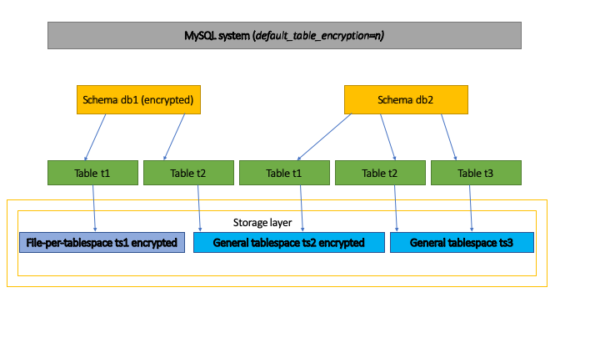
Encryption can be controlled at several levels in the MySQL system. Encryption takes place at the storage level.
Option 1: We want all tables in my system to be encrypted
We want every table in our system to be encrypted. This can easily be achieved with the system-wide configuration parameter default_table_encryption.
If you set default_table_encryption to ‘y’, all new tables will be encrypted. In the figure above, this will be a system level configuration.
Option 2: We want all the tables in my schema to be encrypted
We have a scheme where we want all our tables to be encrypted. When creating the schema, you can set the default encryption attribute. All tables created in the schema will inherit this default schema encryption attribute.
If you look at the figure above, if encryption is set to ‘db1’, all tables will be encrypted for both file table spaces per table, such as ‘ts1’, and shared table spaces, such as ‘ts2’. See sections 3 and 4 for more information.
Option 3: We have a shared table space, and we want it to be encrypted
We use common tabular spaces and want all tables in the tabular space to be encrypted. We know that a shared table space can only contain tables that are encrypted or unencrypted. As you can see in the figure above, we want ‘ts2’ to be encrypted.
So we create a table space and configure it to be encrypted. The ‘t2’ table from the ‘db1’ schema will then be created and stored in ‘ts2’ in an encrypted form because ‘db1’ is created with the default encryption set. When creating ‘ts1’, an encryption condition must be added to ‘db2’ to successfully create a table that will be stored in ‘ts2’. See Section 4 for more information.
Option 4: we want to block overriding the default encryption settings
There are items to override the default encryption settings. we want to prevent any changes to these settings. Looking at the above figure, “db1” has default encryption set, “db2” has no default encryption set, and “ts2” is created as encrypted table space, we want to disable the creation of “t1” from “db2” to “t2”.
We can achieve this by using the configuration parameter – table_encryption_privilege_check = true, which will ask the server to prohibit overriding the encryption parameter. Users with TABLE_ENCRYPTION_ADMIN privilege can always override any check. See Section 5 for more information.
MySQL default encryption
MySQL 8.0.16 provides a server system variable default_table_encryption, which is set to “n” by default when you start the server. Creating a schema or shared tabular space will inherit this parameter. For example, with – default_table_encryption = true
$ CREATE SCHEMA db1;
$ SHOW CREATE SCHEMA db1;
|Database |Create Database
|-
|db1 |CREATE DATABASE `db1`
/*!40100 DEFAULT CHARACTER SET utf8mb4
COLLATE utf8mb4_0900_ai_ci */
/*!80016 DEFAULT ENCRYPTION='Y' */
$ CREATE TABLESPACE ts2 ADD DATAFILE 'df1.ibd';
$ SELECT NAME, ENCRYPTION
FROM INFORMATION_SCHEMA.INNODB_TABLESPACES
WHERE NAME LIKE 'ts2';
|NAME |NAME
|-
|ts2 |Y
This variable allows you to create encrypted tables in the entire MySQL system. Of course, we can override the configuration inheritance by explicitly specifying the encryption type as shown in sections 3. and 4. below.
Note: The default_table_encryption variable parameters can be changed at runtime by users who own the SYSTEM_VARIABLES_ADMIN and TABLE_ENCRYPTION_ADMIN or SUPER privileges.
Default broad encryption scheme
The default encryption for the schema is set using the new DEFAULT ENCRYPTION sentence introduced in MySQL 8.0.16 when creating or modifying a schema. For example:
CREATE SCHEMA db1 DEFAULT ENCRYPTION='y';
Any table created in the ‘db1’ schema will inherit the DEFAULT ENCRYPTION schema sentence parameter.
For example:
$ CREATE TABLE db1.t1 (f1 int);
$ SHOW CREATE TABLE db1.t1;
|Table |Create Table
|-
|t1 |CREATE TABLE `t1` (
`f1` int DEFAULT NULL
) ENGINE=InnoDB DEFAULT CHARSET=utf8mb4
COLLATE=utf8mb4_0900_ai_ci ENCRYPTION='Y'.
$ SELECT TABLE_NAME, CREATE_OPTIONS
FROM INFORMATION_SCHEMA.TABLES
WHERE TABLE_NAME='t1';
|TABLE_NAME |TABLE_OPTIONS
|-
|t1 |ENCRYPTION='Y'
We can override the default ENCRYPTION table by explicitly specifying it in our CREATE operator. Attempts to create an unencrypted table in a scheme with DEFAULT ENCRYPTION = ‘Y’ will trigger a warning. For instance:
$ CREATE TABLE db1.t4 (f1 int) ENCRYPTION='n';
# Warnings:
# Warning 3824 Creating an unencrypted table in a database
# with encryption enabled by default #
Common tabular spaces and default encryption scheme
Suppose we have a ‘db1’ schema with DEFAULT ENCRYPTION set to ‘Y’ and we want to create a table using the common table space in ‘db1’. MySQL expects users to use an encrypted shared table space. For example:
$ CREATE TABLESPACE ts2
ADD DATAFILE 'df1.ibd' ENCRYPTION='y';
$ CREATE SCHEMA db1 DEFAULT ENCRYPTION='y';
$ CREATE TABLE db1.t2 (f1 int) TABLESPACE=ts2;
$ SHOW CREATE TABLE db1.t2;
|Table |Create Table
|-
|t2 |CREATE TABLE `t2` (
`f1` int DEFAULT NULL
) /*!50100 TABLESPACE `ts2` */ ENGINE=InnoDB
DEFAULT CHARSET=utf8mb4 COLLATE=utf8mb4_0900_ai_ci
/*!80016 ENCRYPTION='Y'!
$ SELECT NAME, ENCRYPTION
FROM INFORMATION_SCHEMA.INNODB_TABLESPACES
WHERE NAME LIKE 'ts2';
|NAME |ENCRYPTION
|-
|ts2 |Y
You can create a table using an unencrypted shared table space by explicitly specifying the ENCRYPTION sentence in the CREATE TABLE. This will generate a warning. For example:
$ CREATE TABLESPACE ts4 ADD DATAFILE 'df1.ibd' ENCRYPTION='n';
$ CREATE SCHEMA db1 DEFAULT ENCRYPTION='y';
$ CREATE TABLE db1.t1 (f1 int) TABLESPACE=ts4 ENCRYPTION='n';
# Warnings:
# Warning 3824 creating an unencrypted table in a database
# with encryption enabled by default #
Ensuring encryption of tables
You may have noticed above that we allow overriding the default encryption setting by explicitly providing the DEFAULT ENCRYPTION condition for the schema and the ENCRYPTION offer when creating tables.
However, some users/administrators want to make sure that strict adherence to the rules does not break the default settings. MySQL 8.0.16 provides a new server system variable named table_encryption_privilege_check that can be used to apply the default encryption settings.
MySQL 8.0.16 provides a new privilege named TABLE_ENCRYPTION_ADMIN, which should be given to users who need to override the default encryption settings when table_encryption_privilege_check is enabled .
The ‘table_encryption_privilege_check’ variable can be changed at runtime by users who own the SUPER privilege.
Suppose the server is running with – table_encryption_privilege_check = true and – default_table_encryption = true. And the user is not granted the TABLE_ENCRYPTION_ADMIN privilege.
a) Trying to create a scheme with DEFAULT ENCRYPTION = ‘N’ will cause an error.
$ CREATE SCHEMA db1 DEFAULT ENCRYPTION='n';
# ERROR HY000: Database default encryption differ
# from the 'default_table_encryption' settings
# the user doesn't have enough privileges
b) Attempting to create a table with an encryption type that does not match the encryption scheme will also result in a similar error. For example:
$ CREATE SCHEMA db1;
-- Uses DEFAULT ENCRYPTION='y' because
-- 'default_table_encryption' is true
$ CREATE TABLE db1.t1 (f1 int) ENCRYPTION='n';
# ERROR HY000: Table encryption is different from encryption
# the default database, and the user does not have
# Of sufficient privilege
c) Trying to create a shared table space with ENCRYPTION = ‘N’ will cause an error.
$ CREATE TABLESPACE ts1
ADD DATAFILE 'ts1.ibd' ENCRYPTION='n';
# ERROR HY000: Table space encryption is different from the setting
# 'default_table_encryption', and the user
# doesn't have enough privileges
C – table_encryption_privilege_check = true and – default_table_encryption = false, we will see such a forced ban on encrypted tables in MySQL. For example, if a user tries to create a database with DEFAULT ENCRYPTION = ‘Y’ or a table with ENCRYPTION = ‘Y’, the command will end up with an error message.
The user who owns the TABLE_ENCRYPTION_ADMIN privilege will be able to execute the above statements, canceling the privilege checks.
Learning MySQL- Encryption, Hashing, and Compressing
About Enteros
Enteros offers a patented database performance management SaaS platform. It proactively identifies root causes of complex business-impacting database scalability and performance issues across a growing number of clouds, RDBMS, NoSQL, and machine learning database platforms.
The views expressed on this blog are those of the author and do not necessarily reflect the opinions of Enteros Inc. This blog may contain links to the content of third-party sites. By providing such links, Enteros Inc. does not adopt, guarantee, approve, or endorse the information, views, or products available on such sites.
Are you interested in writing for Enteros’ Blog? Please send us a pitch!
RELATED POSTS
How Can Enterprises Reduce Database Costs Without Sacrificing Performance?
- 11 September 2026
- Database Performance Management
Enterprises can reduce database costs without sacrificing performance by identifying inefficient SQL, right-sizing infrastructure, eliminating unused capacity, analyzing workload patterns, improving storage efficiency, and using database observability to connect resource consumption with application performance. Database cost optimization helps organizations control infrastructure spending while Enteros UpBeat provides performance intelligence, workload visibility, predictive analytics, and Cloud FinOps … Continue reading “How Can Enterprises Reduce Database Costs Without Sacrificing Performance?”
How Can AI Detect Database Performance Anomalies Before They Cause Downtime?
AI can detect database performance anomalies by continuously analyzing workload patterns, SQL behavior, latency, resource usage, waits, and historical baselines. AI database anomaly detection helps identify unusual behavior before it becomes a larger outage. With Enteros UpBeat, IT teams can detect emerging issues earlier, investigate root causes faster, and improve database reliability across complex enterprise … Continue reading “How Can AI Detect Database Performance Anomalies Before They Cause Downtime?”
How Can Financial Institutions Detect Database Bottlenecks Before Transaction Delays Occur?
- 10 September 2026
- Database Performance Management
Financial institutions can detect database bottlenecks before transaction delays occur by continuously monitoring query latency, database waits, CPU, memory, I/O, locking, workload changes, and transaction throughput. By combining performance baselines, anomaly detection, SQL intelligence, predictive analytics, and automated root cause analysis, teams can identify emerging issues early and optimize databases before customer-facing banking, payment, or … Continue reading “How Can Financial Institutions Detect Database Bottlenecks Before Transaction Delays Occur?”
What Role Does AI-Powered Database Monitoring for Banking Play in Performance Management?
AI-powered database monitoring for banking helps financial institutions detect anomalies, identify performance bottlenecks, analyse SQL workloads, predict capacity risks, and accelerate troubleshooting. By combining database observability with automated analysis, AI-powered database performance supports faster incident response, more reliable transactions, better resource utilisation, stronger capacity planning, and smarter cloud cost decisions across increasingly complex banking database … Continue reading “What Role Does AI-Powered Database Monitoring for Banking Play in Performance Management?”