Preamble

MySQL is an open-source database management system (DBMS) from Oracle. It was developed and optimized specifically for web applications. MySQL is an integral part of such web services as Facebook, Twitter, Wikipedia, YouTube, and many others.
This article will tell you how to identify and fix common MySQL server errors.
Can connect to the local server
One of the common mistakes of connecting client to server is “ERROR 2002 (HY000): Can’t connect to local MySQL server through socket ‘/var/run/mysqld.sock’ (2)”.
This error means that the MySQL server (mysqld) is not running on the host or you specified the wrong Unix socket file name or TCP/IP port when trying to connect.
Make sure that the server is running. Check the process with the name mysqld on the server host using ps or grep as shown below.
$ ps xa | grep mysqld | grep -v mysqld
If these commands do not show output data, the database server does not work. Therefore, the client can’t connect to it. To start the server, execute the systemctl command.
$ sudo systemctl start mysql #Debian/Ubuntu
$ sudo systemctl start mysqld #RHEL/CentOS/Ted
To check the status of MySQL service, use the following command:
$ sudo systemctl status mysql #Debian/Ubuntu
$ sudo systemctl status mysqld #RHEL/CentOS/Ted
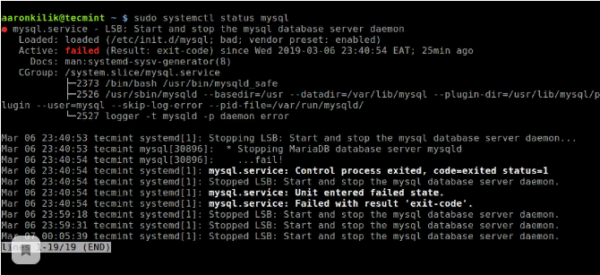
If a MySQL service error occurs as a result of the command execution, you can try to restart the service and check its status again.
$ sudo systemctl restart mysql
$ sudo systemctl status mysql
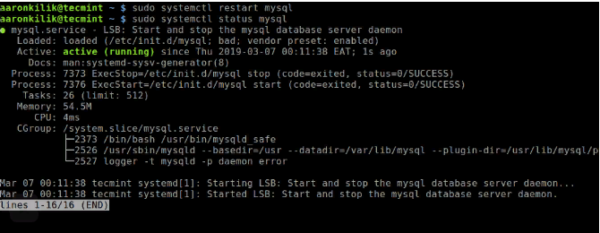
If the server is running (as shown) and you still see this error, you should check if the TCP/IP port is blocked by the firewall or any other port blocking service.
Use the netstat command to find the port that the server is listening to.
$ sudo netstat -tlpn | grep "mysql"
Can connect to MySQL server
Another similar and common connection error is “(2003) Can’t connect to MySQL server on ‘server’ (10061)”. This means that the network connection was denied.
You should check if the MySQL server is running in the system (see above) and if you connect to that port (you can see above how to find the port).
Similar frequent errors you may encounter when trying to connect to the MySQL server:
ERROR 2003: Cannot connect to MySQL server on 'host_name' (111)
ERROR 2002: Cannot connect to local MySQL server through socket '/tmp/mysql.sock' (111)
Errors disabling access to MySQL
In MySQL, an account (Uz) is defined by the user name and the client host from which the user can connect. The username and client host from which a user can connect can also have authentication data (e.g. password).
There may be many reasons for denying access. One of them is related to MySQL accounts, which the server allows client programs to use when connecting. This means that the user name specified in the connection may not have access rights to the database.
In MySQL, it is possible to create accounts that allow users of client programs to connect to the server and access the data. Therefore, in case of an access error, check the permission of the ultrasound to connect to the server through the client program.
You can see the allowed privileges of an account by running the SHOW GRANTS command in the console.
Enter the console (example for Unix, for Windows the console can be found in the start menu):
mysql -u root -p
In the console, enter the command:
> SHOW GRANTS FOR 'tecmint'@'localhost';
You can give privileges to a specific user in the database by IP address using the following commands:
grant all privileges on *.test_db to ‘tecmint’@’192.168.0.100’;
> flush privileges;
Errors of forbidden access can also occur due to problems with MySQL connection (see above).
Loss of MySQL Server connection
You may encounter this error for one of the following reasons:
bad network connection;
the connection waiting time has expired;
BLOB size is larger than max_allowed_packet.
In the first case, make sure you have a stable network connection (especially if you connect remotely).
If you have a problem with the connection timeout (especially when initially connecting MySQL to the server), increase the value of the connect_timeout parameter.
In the case of BLOB size, you should set the higher value for max_allowed_packet in /etc/my.cnf configuration file in [mysqld] or [client] as shown below.
[mysqld]
connect_timeout=100
max_allowed_packet=500M
If the configuration file is not available, this value can be set with the following command.
SET GLOBAL connect_timeout=100;
> SET GLOBAL max_allowed_packet=524288000;
Too many connections
This error means that all available connections are used by client programs. The number of connections (151 by default) is controlled by max_connections system variable. You can fix the problem by increasing the value of the variable in /etc/my.cnf configuration file.
[mysqld]
max_connections=1000
Insufficient memory
If this error occurs, it may mean that MySQL does not have enough memory to store the entire query result.
First, you need to make sure that the query is correct. If it is, you need to perform one of the following actions:
if the MySQL client is used directly, run it with –quick switch to disable cached results;
if you use the MyODBC driver, the user interface (UI) has an extended tab with options. Tick the box “Do not cache result”.
Also can help MySQL Tuner. This is a useful script that connects to a running MySQL server and gives recommendations on how to configure it for higher performance.
$ sudo apt-get install mysqltuner #Debian/Ubuntu
$ sudo yum install mysqltuner #RHEL/CentOS/Ted
$ mysqltuner
To find out the server uptime, run the mysqladmin command.
$ sudo mysqladmin version -p
In addition, you can stop the server, debug MySQL, and restart the service. To display statistics of MySQL processes while other processes are running, open the command line window and enter the following:
$ sudo mysqladmin -i 5 status
Or
$ sudo mysqladmin -i 5 -r status
Conclusion
The most important thing when diagnosing is to understand what exactly caused the error. The following steps will help you do this:
- The first and most important step is to review the MySQL logs stored in /var/log/mysql/. You can use command-line utilities like a tail to read the log files.
- If the MySQL service does not start, check its status with systemctl. Or, use the journalctl command (with -xe flag) in systemd.
- You can also check the system log file (like /var/log/messages) for errors.
- Try using tools such as Mytop, glances, top, ps, or htop to check which program uses the entire CPU resource or locks the machine. They will also help you to detect the lack of memory, disk space, file descriptors or any other important resource.
- If the problem is with a process, you can try to forcefully stop it and then run it (if necessary).
- If you are sure that the problem is on the server-side, you can run the commands: mysqladmin -u root ping or mysqladmin -u root processlist to get an answer from it.
- If the problem is not on the server-side when connecting, check if the client is working properly. Try to get some of its output for troubleshooting.
Enteros
About Enteros
IT organizations routinely spend days and weeks troubleshooting production database performance issues across multitudes of critical business systems. Fast and reliable resolution of database performance problems by Enteros enables businesses to generate and save millions of direct revenue, minimize waste of employees’ productivity, reduce the number of licenses, servers, and cloud resources and maximize the productivity of the application, database, and IT operations teams.
The views expressed on this blog are those of the author and do not necessarily reflect the opinions of Enteros Inc. This blog may contain links to the content of third-party sites. By providing such links, Enteros Inc. does not adopt, guarantee, approve, or endorse the information, views, or products available on such sites.
Are you interested in writing for Enteros’ Blog? Please send us a pitch!
RELATED POSTS
How Enteros Powers Telecom Growth with AI Performance Management and Cloud FinOps
- 9 March 2026
- Database Performance Management
Introduction The telecommunications industry is at the center of global digital transformation. From 5G rollouts and edge computing to streaming services, IoT connectivity, and real-time communication platforms, telecom companies are managing massive volumes of data and increasingly complex infrastructure. Behind every telecom service—voice calls, messaging, video streaming, mobile apps, and connected devices—there is a sophisticated … Continue reading “How Enteros Powers Telecom Growth with AI Performance Management and Cloud FinOps”
Eliminating Healthcare Data Bottlenecks: Enteros Database Software with AI SQL Root Cause Analysis
Introduction Healthcare organizations are under unprecedented pressure to deliver faster, smarter, and more reliable digital services. From electronic health records (EHR) and telemedicine platforms to AI-driven diagnostics and real-time patient monitoring, the healthcare ecosystem depends heavily on robust data infrastructure. At the center of this infrastructure are databases that store and process critical patient, clinical, … Continue reading “Eliminating Healthcare Data Bottlenecks: Enteros Database Software with AI SQL Root Cause Analysis”
How Enteros Transforms Financial Database Management with Predictive Cost Estimation
- 8 March 2026
- Database Performance Management
Introduction The financial sector is experiencing rapid digital transformation. From real-time trading platforms and digital banking applications to AI-driven risk analytics and regulatory reporting systems, financial institutions rely heavily on high-performance data infrastructure. At the heart of this infrastructure are databases that process enormous volumes of transactions, analytics workloads, and customer interactions every second. As … Continue reading “How Enteros Transforms Financial Database Management with Predictive Cost Estimation”
How to Align Insurance Growth Strategy with Database Performance and RevOps Intelligence
Introduction The insurance industry is undergoing a profound transformation. Digital policy management, real-time underwriting, AI-powered risk assessment, and omnichannel customer engagement are reshaping how insurers compete and grow. As organizations scale their digital capabilities, a critical yet often overlooked factor emerges: database performance and operational intelligence. Every insurance operation—from policy issuance and claims processing to … Continue reading “How to Align Insurance Growth Strategy with Database Performance and RevOps Intelligence”