Preamble
In Windows, when the operating system crashes, an emergency memory dump is automatically created and saved in the Windows system directory in the MEMORY.DMP file (%SystemRoot%\MEMORY.DMP).
This file helps to determine the cause of operating system failure and determine the process that may have caused the OS to shut down. The memory dump file can be several gigabytes in size, so special tools are required to analyze it.
The steps to be taken to analyze the MEMORY.DMP emergency memory dump file
To read the MEMORY.DMP file, you will need a special utility: Debugging Tools for Windows (WinDbg), which is part of Windows 10 SDK, you can download it here: Windows 10 SDK, both as an installer and as an ISO file.
The SDK (software development kit) is a development kit that allows software professionals to create applications for a specific software package, software basic development tools, hardware platform, computer system, game consoles, operating systems and other platforms.
Installing Debugging Tools for Windows from the Software Development Kit (SDK)
1. Run the installation file on the computer where the MEMORY.DMP emergency memory dump analysis will be performed.
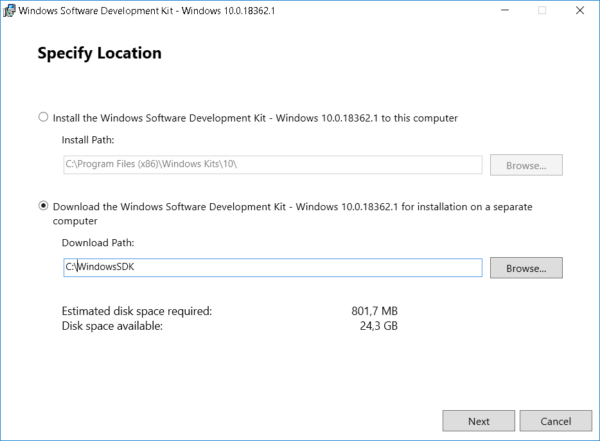
2. Select the installation path and press Next 2 times.
3. Adopt license agreement
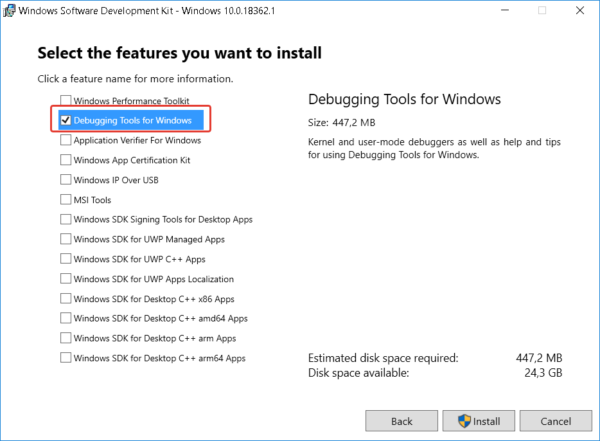
4. Select Debugging Tools for Windows in the window of selecting a set of utilities to be installed (you won’t need any other items to analyze the memory dump) and press Install
5. When the installation is complete, press Close
The Debugging Tools for Windows utility is installed.
MEMORY.DMP emergency memory dump analysis
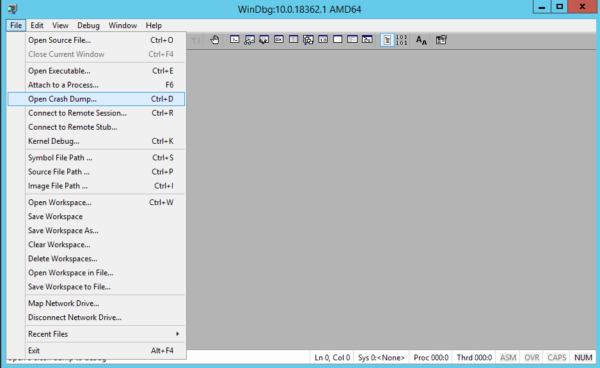
1. Run the installed WinDbg utility and select Open Crash Dump in the File menu.
2. In the file opening window, go to the MEMORY.DMP file path and open it
3. After studying the headlines, click on the link: !analyze -v or enter this command manually
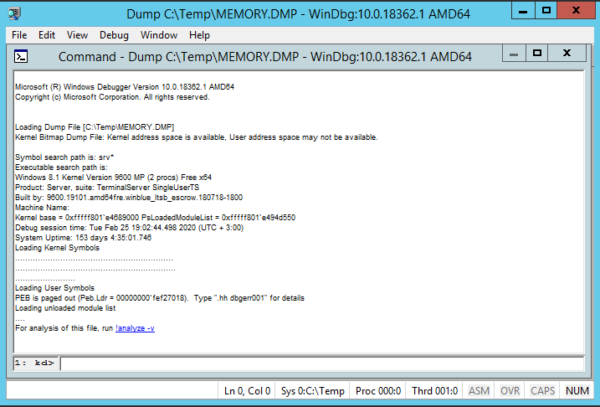
4. Waiting for some time for the utility to read the file and search for errors
5. Analyzing information about the process that caused Windows to crash
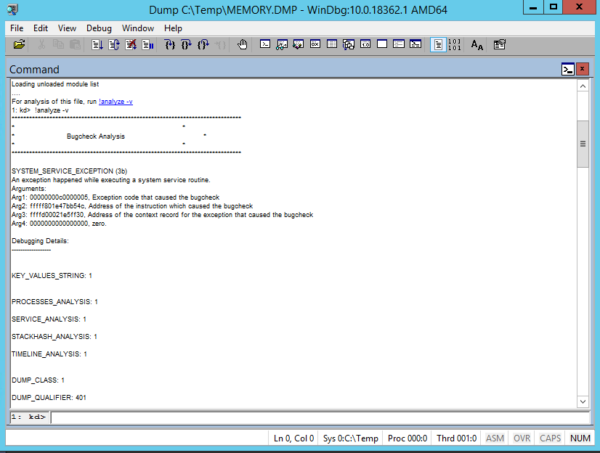
Using this information, you can understand which process caused the OS crash.
If the specified process belongs to the software manufacturer, you can refer to it with the corresponding case.
About Enteros
Enteros offers a patented database performance management SaaS platform. It proactively identifies root causes of complex business-impacting database scalability and performance issues across a growing number of clouds, RDBMS, NoSQL, and machine learning database platforms.
The views expressed on this blog are those of the author and do not necessarily reflect the opinions of Enteros Inc. This blog may contain links to the content of third-party sites. By providing such links, Enteros Inc. does not adopt, guarantee, approve, or endorse the information, views, or products available on such sites.
Are you interested in writing for Enteros’ Blog? Please send us a pitch!
RELATED POSTS
Enhancing Digital Customer Experiences Through Proactive Database Performance Management
- 27 May 2026
- Database Performance Management
Introduction In today’s hyper-connected digital economy, customer experience has become the primary differentiator for businesses across industries. Whether it is eCommerce, financial services, SaaS platforms, or digital payment systems, users expect instant responsiveness, seamless interactions, and uninterrupted availability. Even a delay of a few milliseconds can result in lost transactions, abandoned carts, reduced engagement, and … Continue reading “Enhancing Digital Customer Experiences Through Proactive Database Performance Management”
Why Real-Time Database Analytics Is Essential for Modern SaaS Scalability
Modern SaaS platforms operate in an increasingly competitive digital environment where speed, scalability, uptime, and customer experience directly impact business growth. Whether delivering collaboration tools, fintech applications, e-commerce platforms, healthcare solutions, or enterprise productivity software, SaaS providers depend heavily on databases to support real-time digital operations. As user bases grow and cloud-native infrastructures become more … Continue reading “Why Real-Time Database Analytics Is Essential for Modern SaaS Scalability”
How to Enhance Financial Database Performance with Enteros Intelligent SQL Analytics
- 26 May 2026
- Database Performance Management
Introduction The financial sector is rapidly evolving as banks, insurance companies, fintech providers, investment firms, and digital payment organizations accelerate digital transformation initiatives to improve operational efficiency, customer experiences, and business scalability. Modern financial ecosystems now support: Digital banking platforms Real-time payment systems Fraud detection environments Financial analytics platforms AI-driven customer engagement systems Investment management … Continue reading “How to Enhance Financial Database Performance with Enteros Intelligent SQL Analytics”
How to Improve Patient Experience with Enteros Generative AI and Operational Visibility
Introduction The healthcare industry is rapidly transforming as hospitals, healthcare providers, and digital health organizations adopt cloud technologies, AI-driven systems, and data-centric infrastructures to improve patient care and operational efficiency. Modern healthcare ecosystems now support: Electronic health record (EHR) systems Telemedicine platforms Patient engagement applications Medical imaging systems AI-driven diagnostics Healthcare analytics platforms Hospital management … Continue reading “How to Improve Patient Experience with Enteros Generative AI and Operational Visibility”