Preamble
In Windows, when the operating system crashes, an emergency memory dump is automatically created and saved in the Windows system directory in the MEMORY.DMP file (%SystemRoot%\MEMORY.DMP).
This file helps to determine the cause of operating system failure and determine the process that may have caused the OS to shut down. The memory dump file can be several gigabytes in size, so special tools are required to analyze it.
The steps to be taken to analyze the MEMORY.DMP emergency memory dump file
To read the MEMORY.DMP file, you will need a special utility: Debugging Tools for Windows (WinDbg), which is part of Windows 10 SDK, you can download it here: Windows 10 SDK, both as an installer and as an ISO file.
The SDK (software development kit) is a development kit that allows software professionals to create applications for a specific software package, software basic development tools, hardware platform, computer system, game consoles, operating systems and other platforms.
Installing Debugging Tools for Windows from the Software Development Kit (SDK)
1. Run the installation file on the computer where the MEMORY.DMP emergency memory dump analysis will be performed.
2. Select the installation path and press Next 2 times.
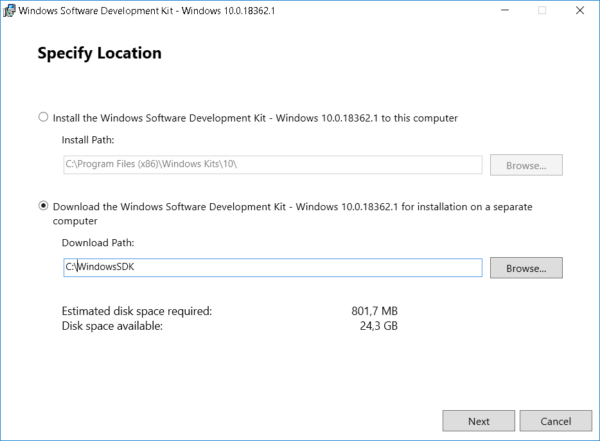
3. Adopt license agreement
4. Select Debugging Tools for Windows in the window of selecting a set of utilities to be installed (you won’t need any other items to analyze the memory dump) and press Install
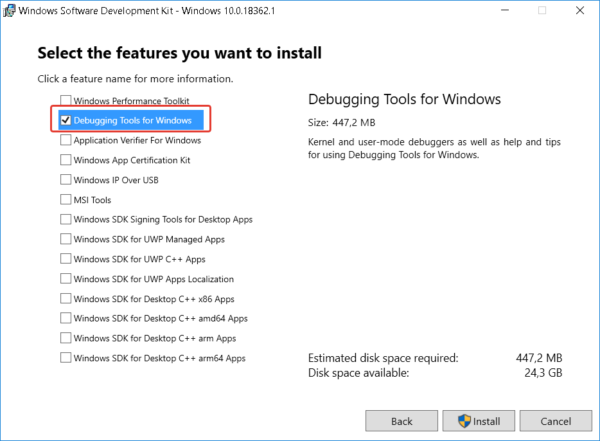
5. When the installation is complete, press Close
The Debugging Tools for Windows utility is installed.
MEMORY.DMP emergency memory dump analysis
1. Run the installed WinDbg utility and select Open Crash Dump in the File menu.
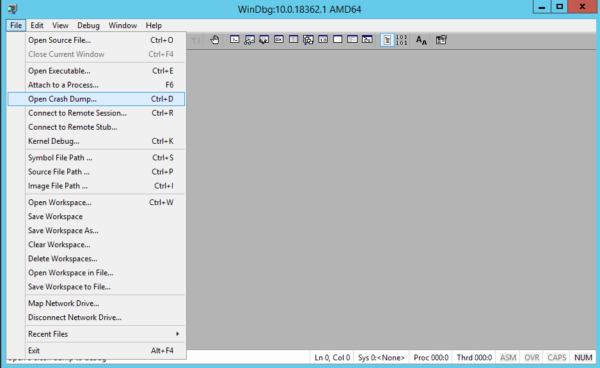
2. In the file opening window, go to the MEMORY.DMP file path and open it
3. After studying the headlines, click on the link: !analyze -v or enter this command manually
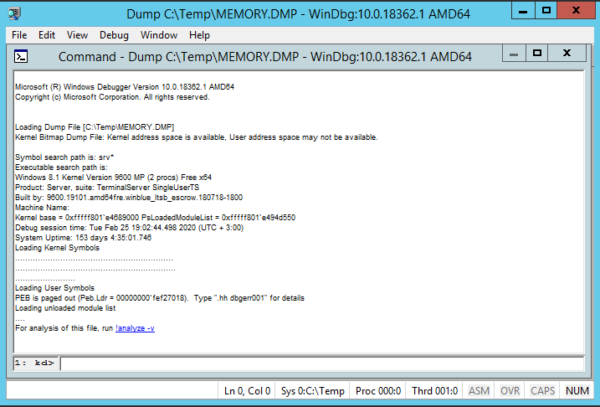
4. Waiting for some time for the utility to read the file and search for errors
5. Analyzing information about the process that caused Windows to crash
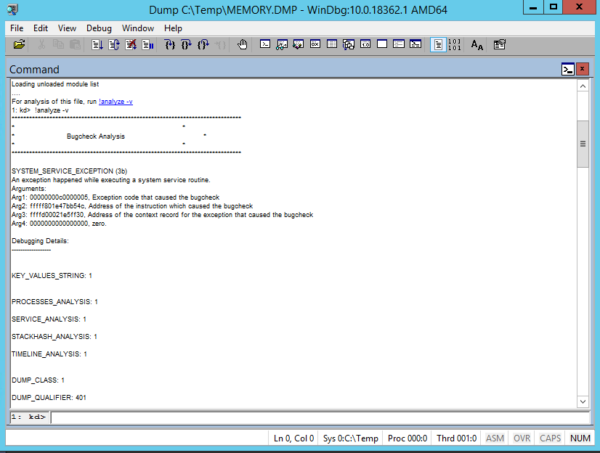
Using this information, you can understand which process caused the OS crash.
If the specified process belongs to the software manufacturer, you can refer to it with the corresponding case.
About Enteros
Enteros offers a patented database performance management SaaS platform. It proactively identifies root causes of complex business-impacting database scalability and performance issues across a growing number of clouds, RDBMS, NoSQL, and machine learning database platforms.
The views expressed on this blog are those of the author and do not necessarily reflect the opinions of Enteros Inc. This blog may contain links to the content of third-party sites. By providing such links, Enteros Inc. does not adopt, guarantee, approve, or endorse the information, views, or products available on such sites.
Are you interested in writing for Enteros’ Blog? Please send us a pitch!
RELATED POSTS
How Can Telecom Companies Prevent Database Bottlenecks During Mass Service Activations and Provisioning Events?
- 23 September 2026
- Database Performance Management
Telecom companies can avoid database bottlenecks during mass service activations by monitoring SQL performance, provisioning transactions, database waits, locking, resource utilisation, workload spikes and application dependencies. Good telecom service provisioning database performance management allows teams to identify bottlenecks earlier, tune high-impact queries, plan capacity more intelligently, and keep activation workflows humming along during periods of … Continue reading “How Can Telecom Companies Prevent Database Bottlenecks During Mass Service Activations and Provisioning Events?”
How Can Real Estate Platforms Prevent Database Slowdowns During High-Volume Property Searches and Listing Updates?
By continuously monitoring SQL performance, property-search workloads, listing updates, database waits, resource utilisation and unusual workload changes, real estate platforms can avoid database slowdowns. Effective real estate database performance monitoring enables technology teams to identify bottlenecks sooner, optimise high-impact queries, enhance database observability and sustain responsive property search and listing experiences during periods of heavy … Continue reading “How Can Real Estate Platforms Prevent Database Slowdowns During High-Volume Property Searches and Listing Updates?”
How Can Retail IT Teams Improve Database Capacity Planning for Peak Demand?
- 22 September 2026
- Database Performance Management
Retail IT teams can improve retail database capacity planning by analyzing historical workloads, monitoring SQL performance, tracking CPU, memory, storage, connections, and transaction growth, and forecasting future demand. Strong retail database performance management helps teams identify capacity risks before peak events, while Enteros supports proactive planning with observability, anomaly detection, predictive analytics, and workload intelligence. … Continue reading “How Can Retail IT Teams Improve Database Capacity Planning for Peak Demand?”
How Can Telecom Providers Improve Database Scalability for 5G and IoT Growth?
By integrating SQL optimisation, continuous observability, workload monitoring, anomaly detection, capacity planning, and effective cloud resource management, telecom operators can increase the scalability of telecom databases. Infrastructure that can manage quickly increasing device and transaction loads is necessary for robust database performance for 5G networks. Enteros assists telecom teams with capacity forecasting, bottleneck identification, and … Continue reading “How Can Telecom Providers Improve Database Scalability for 5G and IoT Growth?”