Preamble
The data type is defined as the type of data that any column or variable can store in MS SQL Server.
What is the data type?
When you create any table or variable, in addition to specifying a name, you also specify the data type that it will store.
How to use MS SQL data type
- It is necessary to define in advance the type of data that a column or a variable can store. The definition of the data type also limits the user from entering any unexpected or invalid data.
- You can effectively use memory by assigning the appropriate data type to a variable or column that will allocate only the necessary amount of system memory for the data in the corresponding column.
- MS SQL offers a wide category of data types according to user needs. Like a date, binary images, etc.
Why use DataTypes?
Let’s take a sample of a simple web site application registration page. Three input fields: First name, Last name, and Contact number.
Here it should be noted that in real-time:
- “The Name/Surname will always be alphabetical.
- The “Contact” will always be numeric.
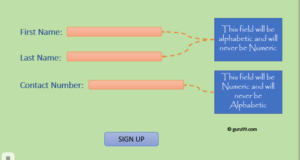
- From the above figure, you should specify “Name/Surname” as a symbol and “Contact” as an integer.
Obviously, in any application, all fields have one or the other data type. For example, numerical, alphabetic, date, and much more.
Also, note that different types of data have different memory requirements. So it makes sense to define a column or a variable with the type of data it will store for efficient memory usage.
The data type is available in MS SQL
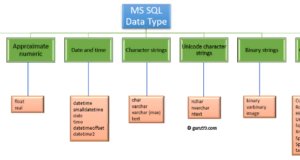
MS SQL Server supports the following categories of data type:
- Exact number
- Approximate numerical
- Date and time
- Character strings
- Unicode Character Strings
- Binary rows
- Other types of data
Exact number
An exact number has nine types of data types.
Accurate numeric data types
| Data type | Description | Lower limit | Upper limit | Memory |
|---|---|---|---|---|
| BIGINT | It stores integers in the specified range | -2 ^ 63 (-9 223 372, 036 854 775 808) | 2 ^ 63−1 (−9 223 372, 036 854 775 807) | 8 bytes |
| INT | It stores integers in the specified range | −2 ^ 31 (-2,147, 483,648) | 2 ^ 31−1 (-2,147, 483,647) | 4 bytes |
| SMALLINT | It stores integers in the specified range | −2 ^ 15 (−32,767) | 2 ^ 15 (−32 768) | 2 bytes |
| TINYINT | It stores integers in the specified range | 0 | 255 | 1 byte |
| a little | Can take values 0, 1 or NULL | 0 | 1 | 1 byte / 8-bit column |
| decimal | Used for numbers and fixed precision numbers | -10 ^ 38 + 1 | 10 ^ 381-1 | 5 to 17 bytes |
| numeric | Used for numbers and fixed precision numbers | -10 ^ 38 + 1 | 10 ^ 381-1 | 5 to 17 bytes |
| Money | Used monetary data | −922,337, 203, 685,477.5808 | +922,337, 203, 685,477.5807 | 8 bytes |
| small money | Used monetary data | -214,478.3648 | +214,478.3647 | 4 bytes |
Examples:
Request:
DECLARE @Datatype_Int INT = 2
PRINT @Datatype_Int
Exit: 2
Syntax: decimal (P, S)
Here you go,
- Accuracy
- S is the scale
Request:
DECLARE @Datatype_Decimal DECIMAL (3.2) = 2.31
PRINT @Datatype_Decimal
Output: 2.31
Approximate Numerical
The approximate numerical category includes floating-point numbers and actual values. They are mainly used in scientific calculations.
Approximate numeric data type
| Data type | Description | Lower limit | Upper limit | Memory | Accuracy |
|---|---|---|---|---|---|
| Float (n) | Used for a floating precision number | -1.79E + 308 | 1.79E + 308 | Depends on the value of n | 7 digits |
| real | Used for a floating precision number | -3.40E + 38 | 3.40E + 38 | 4 bytes | 15-digit |
Syntax: FLOAT [(n)]
Here n is the number of bits that are used to store a mantissa with a floating-point in a scientific record. By default, n is 53.
When a user defines a data type such as float, n should be between 1 and 53.
SQL Server handles n as one of two possible values. If 1 <= n <= 24, n is treated as 24. If 25 <= n <= 53, n is treated as 53.
Example of a query:
DECLARE @Datatype_Float FLOAT(24) = 22.1234
PRINT @Datatype_Float
Exit: 22.1234
Date and time
This is where data like date and time are stored.
Date and Time Data type
| Data type | Description | Storage Size | accuracy | Lower range | Upper Range |
|---|---|---|---|---|---|
| DateTime | Used to specify the date and time from January 1, 1753 to December 31, 9999. Accuracy is 3.33 milliseconds. | 8 bytes | Rounded in .000, .003, .007 steps | 1753-01-01 | 9999-12-31 |
| smalldatetime | Used to specify the date and time from 1 January 0001 to 31 December 9999. It has an accuracy of 100 nanoseconds | 4 bytes, corrected | 1 minute | 1900-01-01 | 2079-06-06 |
| date | Used for storage only dates from 1 January 0001 to 31 December 9999 | 3 bytes, corrected | 1 day | 0001-01-01 | 9999-12-31 |
| time | It is used to store only time values with an accuracy of 100 nanoseconds | 5 bytes | 100 nanoseconds | 00: 00: 00,0000000 | 23: 59: 59,9999999 |
| DateTimeOffset | Similar to the time data, but has a time zone offset | 10 bytes | 100 nanoseconds | 0001-01-01 | 9999-12-31 |
| datetime2 | Used to specify the date and time from 1 January 0001 to 31 December 9999 | 6 bytes | 100 nanoseconds | 0001-01-01 | 9999-12-31 |
Example of request:
DECLARE @Datatype_Date DATE = '2030-01-01'.
PRINT @Datatype_Date
Output: “2030-01-01”
Character strings
This category refers to the type of characters. It allows the user to define a character data type that can be fixed and variable in length. It has four types of data types.
Data type Character strings
| Data type | Description | Lower limit | Upper limit | Memory |
|---|---|---|---|---|
| CHAR | This is a string of characters with a fixed width. It stores no more than 8000 characters. | 0 characters | 8000 characters | n bytes |
| VARCHAR | This is a string of characters with a variable width | 0 characters | 8000 characters | n bytes+ 2 byte |
| VARCHAR (Max) | This is a string of characters with variable width. It stores no more than 1 073 741 824 characters. | 0 characters | 2 ^ 31 characters | n bytes + 2 byte |
| Text | This is a string of characters with variable width. It stores a maximum of 2 GB of text data. | 0 characters | 2 147 483 647 characters | n bytes + 4 byte |
Example of request:
DECLARE @Datatype_Char VARCHAR(30) = 'This is Character Datatype'.
PRINT @Datatype_Char
Conclusion: this is the character’s data type
Unicode Character Strings
This category stores the entire range of Unicode characters, which uses UTF-16 encoding.
Unicode character string data types
| Data type | Description | Lower limit | Upper limit | Memory |
|---|---|---|---|---|
| NCHAR | This is a fixed-width Unicode string | 0 characters | 4000 characters | 2 times n bytes |
| NVARCHAR | This is a Unicode string of variable width | 0 characters | 4000 characters | 2 times n bytes+ 2 byte |
| NTEXT | This is a Unicode string of variable width | 0 characters | 1 073 741 823 symbol | 2 times the length of the line |
Example of request:
DECLARE @Datatype_nChar VARCHAR(30) = 'This is nCharacter Datype'.
PRINT @Datatype_nChar
Conclusion: this is nCharacter Datatype
Binary string
This category contains a binary string of fixed and variable lengths.
Binary String Data Types
| Data type | Description | Lower limit | Upper limit | Memory |
|---|---|---|---|---|
| Binary | This is a binary string of fixed width. It stores a maximum of 8,000 bytes. | 0 byte | 8000 byte | n bytes |
| VARBINARY | This is a binary string of variable width. It stores a maximum of 8000 bytes. | 0 byte | 8000 byte | The actual length of entered data + 2 bytes |
| Image | This is a binary string of variable width. It stores a maximum of 2 GB. | 0 byte | 2 147 483 647 byte |
Example of request:
DECLARE @Datatype_Binary BINARY(2) = 12;
PRINT @Datatype_BinaryOutput: 0x000C
Other types of data
These are the other data types described below:
| Data type | Description |
|---|---|
| Cursor | Its output is the column sp_cursor_list and sp_describe_cursor. Returns the name of the cursor variable |
| String version | This version marks the rows in the table |
| hierarchyid`on | This data type represents the position in the hierarchy |
| Unique identifier | Conversion from a symbolic expression. |
| sQL_VARIANT | It stores the values of data types supported by the SQL server |
| XML | It stores XML data in a column |
| Type of spatial geometry | It represents data in a flat coordinate system |
| Type of spatial geography | It presents data in a circular coordinate system |
| Table | It stores a set of results for further processing |
Interesting facts!
CHAR data type is faster than VARCHAR when receiving data.
Summary:
- Each column in a table is defined by its data type when creating the table.
- There are six main categories and one more category. The other different ones have nine subcategories of available data types.
The views expressed on this blog are those of the author and do not necessarily reflect the opinions of Enteros Inc. This blog may contain links to the content of third-party sites. By providing such links, Enteros Inc. does not adopt, guarantee, approve, or endorse the information, views, or products available on such sites.
Are you interested in writing for Enteros’ Blog? Please send us a pitch!
RELATED POSTS
How Can Enterprises Reduce Database Costs Without Sacrificing Performance?
- 11 September 2026
- Database Performance Management
Enterprises can reduce database costs without sacrificing performance by identifying inefficient SQL, right-sizing infrastructure, eliminating unused capacity, analyzing workload patterns, improving storage efficiency, and using database observability to connect resource consumption with application performance. Database cost optimization helps organizations control infrastructure spending while Enteros UpBeat provides performance intelligence, workload visibility, predictive analytics, and Cloud FinOps … Continue reading “How Can Enterprises Reduce Database Costs Without Sacrificing Performance?”
How Can AI Detect Database Performance Anomalies Before They Cause Downtime?
AI can detect database performance anomalies by continuously analyzing workload patterns, SQL behavior, latency, resource usage, waits, and historical baselines. AI database anomaly detection helps identify unusual behavior before it becomes a larger outage. With Enteros UpBeat, IT teams can detect emerging issues earlier, investigate root causes faster, and improve database reliability across complex enterprise … Continue reading “How Can AI Detect Database Performance Anomalies Before They Cause Downtime?”
How Can Financial Institutions Detect Database Bottlenecks Before Transaction Delays Occur?
- 10 September 2026
- Database Performance Management
Financial institutions can detect database bottlenecks before transaction delays occur by continuously monitoring query latency, database waits, CPU, memory, I/O, locking, workload changes, and transaction throughput. By combining performance baselines, anomaly detection, SQL intelligence, predictive analytics, and automated root cause analysis, teams can identify emerging issues early and optimize databases before customer-facing banking, payment, or … Continue reading “How Can Financial Institutions Detect Database Bottlenecks Before Transaction Delays Occur?”
What Role Does AI-Powered Database Monitoring for Banking Play in Performance Management?
AI-powered database monitoring for banking helps financial institutions detect anomalies, identify performance bottlenecks, analyse SQL workloads, predict capacity risks, and accelerate troubleshooting. By combining database observability with automated analysis, AI-powered database performance supports faster incident response, more reliable transactions, better resource utilisation, stronger capacity planning, and smarter cloud cost decisions across increasingly complex banking database … Continue reading “What Role Does AI-Powered Database Monitoring for Banking Play in Performance Management?”