SQL Server Recovery Models: A Quick Guide
The transaction logs are managed by a recovery model in a Structured query language (SQL) Server, which controls how they are logged, backed up, and restored. A master database file (MDF) and a log database file (LDF) are both included in the SQL Server database (LDF). All database objects, such as tables, stored procedures, and information, are saved in the MDF file. All logs, such as transactions that occur in a database, are stored in the LDF log file. There seem to be three kinds of efforts to improve in SQL Server:
- Simple
- Full
- Model for bulk-logged recovery.
In this blog post, we’ll look at finding the existing model in our database, the advantages and disadvantages of the three SQL Server recovery models, and how to modify the model.
How to find the existing recovery model in SQL Server
You may find out your Database’s current recovery model by utilizing one of the methods below.
SQL Server Management Studio is a tool for managing SQL Server databases.
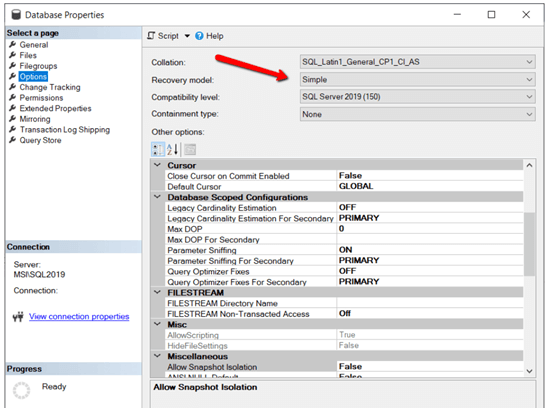
Using SQL Server Management Studio, follow these simple steps to determine what the current recovery model is:
- To begin, launch SQL Server Management Studio.
- Then, right-click on the Database and choose Properties from the drop-down menu.
-

-
- The Database Properties window will now display on the screen—select Options from the left pane of that window. The current recovery model in your database will then be shown.
Take a look at the image below.
Query in SQL
You can also find the recovery model in a database by running the SQL query below.
SELECT name, recovery_model_desc FROM sys.databases WHERE name = 'My_Database_Name' ;
Three types of recovery models in SQL Server
The backup and restoration options for a database are determined by the three recovery types (primary, complete, and bulk-logged). Depending on the recovery model, we can restore data if the database malfunctions or crashes.
The simple model of recovery
The most basic recovery technique in SQL Server is the simple recovery model. Every completed transaction in this model causes the transaction log records to be immediately removed. As a result, transaction log backups are not supported; only full or differential backups are kept.
If the database fails or crashes, you can restore it using the most recent complete or differential backup. When using the simple recovery paradigm, we cannot do a point-in-time restoration. As a result, updated data between the most recent full or differential backup and the moment of failure may be lost.
Advantages
- Because the basic recovery approach automatically removes the transaction logs, the disk space required is minimal.
- Compared to the complete and bulk-logged recovery methods, it takes minor administration.
Disadvantages
- The simple recovery paradigm has one fundamental flaw: it does not support point-in-time restore. As a result, in the case of a database failure, data may be lost.
- This recovery technique is not appropriate for an organization’s production databases because it will not tolerate data loss.
Model of complete recovery
The transaction logs are kept in SQL Server’s complete recovery model until they are backed up. We may restore the database using this paradigm at any point and lose no data.
Like the simple recovery model, the comprehensive recovery model keeps track of transaction logs. It will not, however, automatically erase them after each completed transaction. The transaction logs also capture the creation and alteration of indexes and insert and update transactions. Because each transaction is logged, resulting in a large log file. As a result, management must keep a constant eye on the expanding log size.
The database will fail to admit new transactions until the transaction log is backed up or truncated if the transaction log becomes full.
Advantages
- We can go back to any point in time and restore the data. As a result, this model assists us in avoiding data loss.
Disadvantages
- The transaction log file is enormous, and it continues to grow in size with each transaction.
- The administration must keep a close eye on the expanding log size.
- The database will reject new transactions if the transaction log is complete.
Model for bulk-logged recovery
The total recovery model and the bulk-logged recovery model are comparable. The only difference is when conducting bulk-logged actions like bulk insert, select into, and build the index. The transaction log size is reduced. As a result, compared to the full recovery model, the transaction log size in this approach is modest.
Due to the low logging of bulk transactions, the bulk-logged recovery approach improves the performance of massive bulk processes. In some circumstances, this model will not reconstruct a moment in time. Only if no bulk-logged activities are conducted during the period of database malfunctions or crashes may a point-in-time restore be performed.
If you do a measurement process, we can only restore the database to the last transaction log before recording the bulk operation.
Advantages
- Compared to the complete recovery approach, the transaction log file size will not grow dramatically.
- Point-in-time restoration is also possible in the bulk-logged recovery approach, but only in certain circumstances.
- Due to limited logging, this paradigm improves the performance of bulk processes.
Disadvantages
- In some circumstances, point-in-time restoration isn’t possible.
How to change the recovery model
Before modifying a database’s recovery model, we must first examine the Database’s activities. It is suggested that we adjust the recovery model when the database activity is low.
We need to perform a thorough database backup before changing the recovery model. We can quickly return it to its original state if anything goes wrong.
To alter the restoration model of a SQL database, utilize one of the methods below.
SQL Server Management Studio is a tool for managing SQL Server databases.
To modify the recovery model in SQL Server Management Studio, follow these steps:
- To begin, launch SQL Server Management Studio.
- Then pick Properties from the right-click menu on Database.
- The Database Properties window will now display on the screen. Select Options from the left pane of that window.
- Then, from the drop-down menu, choose the new recovery model.
- Finally, to apply the changes, click Ok.
Query in SQL
You can also modify a database’s recovery model with the SQL statement below.
USE [My_Database_Name] ; ALTER DATABASE [My_Database_Name] SET RECOVERY FULL ;
Conclusion
We hope you now understand the three different SQL Server recovery models, check which one is used, and modify it in your database. Try out the methods in this blog post, and let us know what you think in the comments!
For WinForms, WPF, WinUI, ASP.NET (Web Forms, MVC, Core), UWP, Xamarin, Flutter, JavaScript, Angular, Blazor, Vue, and React, Syncfusion has over 1,600 components and frameworks. Use these to speed up the development of your app.
The views expressed on this blog are those of the author and do not necessarily reflect the opinions of Enteros Inc. This blog may contain links to the content of third-party sites. By providing such links, Enteros Inc. does not adopt, guarantee, approve, or endorse the information, views, or products available on such sites.
Are you interested in writing for Enteros’ Blog? Please send us a pitch!
RELATED POSTS
What Financial CIOs Should Know About Enteros: AI SQL, Generative AI, and Cost-Performance Optimization for Scalable Growth
- 19 February 2026
- Database Performance Management
Introduction In the financial sector, performance is not optional—it is existential. Banks, insurance providers, capital markets firms, fintech platforms, and digital payment companies operate in environments where milliseconds matter, compliance is mandatory, and cost discipline directly impacts shareholder value. Every transaction—loan approvals, trade executions, fraud checks, underwriting decisions, portfolio rebalancing, digital payments—flows through database systems. … Continue reading “What Financial CIOs Should Know About Enteros: AI SQL, Generative AI, and Cost-Performance Optimization for Scalable Growth”
How to Control Blob Storage and Database Costs in the Fashion Sector with Enteros’ AI-Driven Cost Attribution Platform
- 18 February 2026
- Database Performance Management
Introduction The fashion sector has undergone a radical digital transformation. From fast-fashion e-commerce platforms and luxury omnichannel brands to global supply chain ecosystems and AI-driven personalization engines, modern fashion businesses are now powered by data. Every product image, runway video, influencer campaign asset, 3D design file, transaction record, inventory update, recommendation engine query, and customer … Continue reading “How to Control Blob Storage and Database Costs in the Fashion Sector with Enteros’ AI-Driven Cost Attribution Platform”
How to Drive Technology Sector Growth with Enteros: AI SQL–Powered Database Management and Cloud FinOps Intelligence
Introduction The technology sector operates at the speed of innovation. SaaS platforms process millions of transactions per hour. Fintech applications require millisecond-level latency. AI-driven applications continuously generate and analyze vast data volumes. DevOps teams deploy code multiple times per day. Revenue Operations (RevOps) teams demand real-time visibility into pipeline, usage, renewals, and expansion metrics. Behind … Continue reading “How to Drive Technology Sector Growth with Enteros: AI SQL–Powered Database Management and Cloud FinOps Intelligence”
How to Achieve Real Estate Cost Transparency with Enteros: AI SQL Analytics and AIOps Platform Intelligence
- 17 February 2026
- Database Performance Management
Introduction Real estate has evolved into a technology-driven industry. From digital property marketplaces and smart building platforms to tenant apps, CRM systems, leasing automation tools, and investment analytics dashboards—modern real estate enterprises depend on complex data ecosystems. Every lease agreement, rent payment, occupancy report, maintenance request, and investor presentation is powered by databases running behind … Continue reading “How to Achieve Real Estate Cost Transparency with Enteros: AI SQL Analytics and AIOps Platform Intelligence”