SQL server
We’ll go over how to use SQL Server’s UPDATE from the SELECT command in this post.
In the realm of databases, static data is rarely stored. Instead, it evolves as we update existing data, archive or delete obsolete information, and so on. Imagine you have a table in your shopping site that stores product pricing data. Because you may provide goods discounts to your clients at different periods, product prices constantly change. Because the product record already exists, you cannot add new rows to the table in this scenario, but you must adjust the current prices for existing goods.
The UPDATE query is used in this situation. The UPDATE query updates data in an existing database row. Using the WHERE clause, you can change all table rows or just the affected ones. SQL updates are usually conducted with a direct reference to an existing table. In a [employee] table, for example, a requirement must be to increase the wage of all active employees by 10%. The direct reference SQL query in this scenario will be:
Set [salary]= salary + (salary * 10 / 100) for employees with [active]=1.
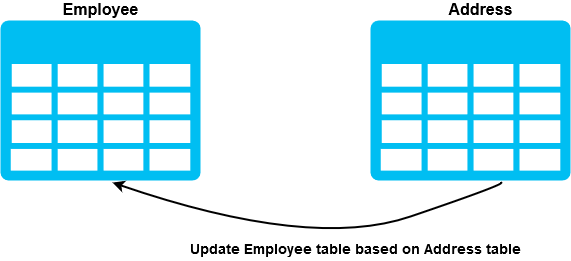
Assume you have another table [Address] that records employee addresses, and you need to update the [Employee] table using the data from the [Address] table. How do you make changes to the [Employee] table’s data?
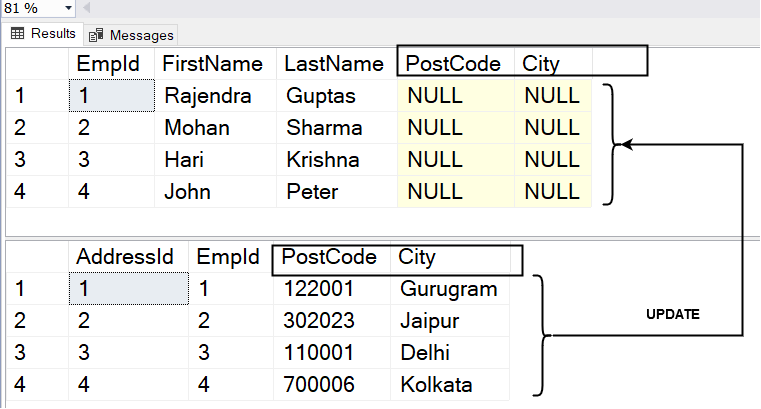
Fortunately, there is a workaround: use the UPDATE from the SELECT query. In the next section, we’ll look at a few alternative ways to update a table using a SELECT statement. In the accompanying screenshot, the fields [PostCode] and [City] in the [Employee] table have NULL values. Both columns [PostCode] and [City] in the [Address] database have values.
Method 1: UPDATE from SELECT: Join Method
In this procedure, SQL Joins refer to the secondary table containing the data that needs to change. As a result, the data in the reference columns for the provided circumstances in the target database change.
In this case, using the UPDATE from the SELECT command is essential. To acquire the values of the reference and target columns, execute the SELECT statement first.
SELECT e.City,A.City, e.PostCode,A.PostCode FROM Employee e INNER JOIN [Address] a ON e.EmpID = A.EmpID
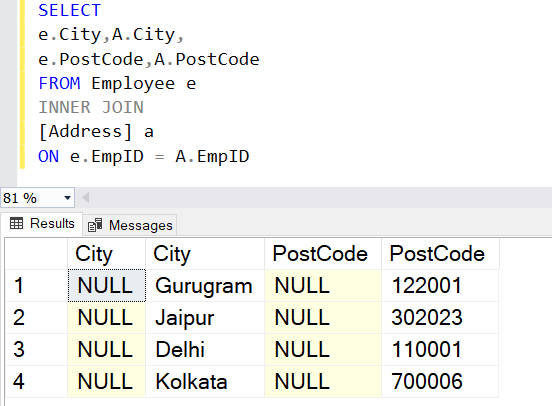
After that, you’ll make minor adjustments to your query, and it’ll generate an UPDATE statement as shown below.
Replace the term select with the word update.
Give the name of the table or alias that needs to be modified.
Use the set keyword and the equals symbol (=).
UPDATE e set e.City=A.City, e.PostCode=A.PostCode FROM Employee e INNER JOIN [Address] a ON e.EmpID = A.EmpID
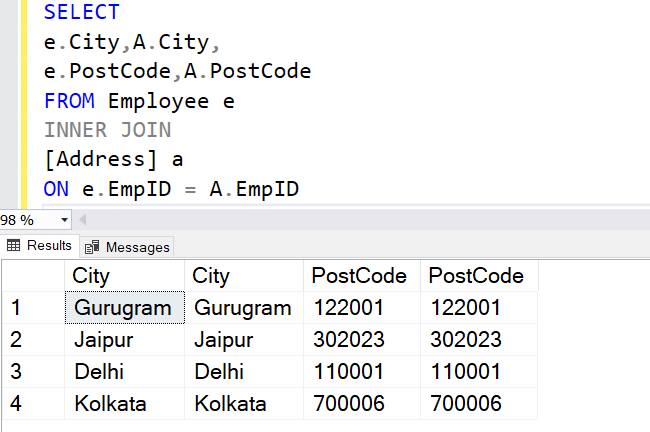
Then run the UPDATE statement and double-check that the values in the source and target columns are identical.
Method 2: UPDATE from SELECT: The MERGE statement
For both matched and mismatched rows, the MERGE statement helps modify the destination table’s data based on the source table’s data. It’s a different way of performing the UPDATE function from the SELECT statement.
The following tasks are performed in the example MERGE statement below:
- To update data in the [Employee] table, use the MERGE command.
- When the USING clause is used, it refers to another table.
- The merging JOIN (Inner Join) between the source and target tables is then specified by the WHEN MATCHED clause.
- The THEN UPDATE statement is then used to update the [PostCode] and [City] from the [Address] table into the [Employee] table, followed by source and target column mappings.
- A semicolon always follows the MERGE sentence (;).
MERGE Employee AS e USING(SELECT * FROM [Address]) AS A ON A.EmpID=e.EmpID WHEN MATCHED THEN UPDATE SET e.PostCode=A.PostCode , e.City = A.City;
Method 3: UPDATE from SELECT: Subquery method
The subquery specifies a query utilized within a SELECT, INSERT, UPDATE, or DELETE statement. It’s a simple approach for updating existing table data with data from other tables.
- The above query uses a SELECT view in the SET clause of the UPDATE statement.
- If the subquery finds a matched entry, the update query updates the records for the individual employee.
- The column is updated to NULL if the subquery returns NULL (no matching record).
- The UPDATE command raises an error if the subquery returns more than one matched row – “SQL Server Subquery returned more than one value.” When the subquery employs comparison operators (=,!=, =, >, >=), this is not allowed.”
Limitations on subqueries
- Except when using the IN or EXISTS operators, a comparison operator’s subquery can only have one column name. As a result, if we need to update various columns of data, we’ll need to use different SQL statements.
- You can’t utilize the data types ntext, text, or picture in the subquery.
- If the subquery contains an unmodified comparison operator, it cannot include GROUP BY and the HAVING clause. The words ANY or ALL cannot be used with the actual comparison operator.
UPDATE Employee SET Employee.City=(SELECT [Address].city FROM [Address] WHERE [Address].EmpID = Employee.EmpId)
Performance comparison between different UPDATE from SELECT statements
This part will compare the performance of several updates from SELECT methods. To do so, we’ll run the SQL queries together, then enable the actual execution plan (Ctrl + M) in SQL Server Management Studio and use the Go statement to separate them.
For my demo, I collect the following data from the execution plans:
- The Join Method has a query cost of 41%. (relative to the overall batch)
- The MERGE statement has a query cost of 34%. (close to the comprehensive collection)
- The subquery approach has a query cost of 24%. (relative to the overall batch)
The different sort costs 40% of the JOIN method’s cost, whereas the clustered index update costs 35%.
The merge join employs an inner join to match data rows between the source and target data. It also has the highest relative sort operator cost.
The subquery is the fastest method to update column data. It uses the clustered index update and clustered index scan as highlighted.
About Enteros
Enteros offers a patented database performance management SaaS platform. It proactively identifies root causes of complex business-impacting database scalability and performance issues across a growing number of RDBMS, NoSQL, and machine learning database platforms.
The views expressed on this blog are those of the author and do not necessarily reflect the opinions of Enteros Inc. This blog may contain links to the content of third-party sites. By providing such links, Enteros Inc. does not adopt, guarantee, approve, or endorse the information, views, or products available on such sites.
Are you interested in writing for Enteros’ Blog? Please send us a pitch!
RELATED POSTS
How Can Enterprises Reduce Database Costs Without Sacrificing Performance?
- 11 September 2026
- Database Performance Management
Enterprises can reduce database costs without sacrificing performance by identifying inefficient SQL, right-sizing infrastructure, eliminating unused capacity, analyzing workload patterns, improving storage efficiency, and using database observability to connect resource consumption with application performance. Database cost optimization helps organizations control infrastructure spending while Enteros UpBeat provides performance intelligence, workload visibility, predictive analytics, and Cloud FinOps … Continue reading “How Can Enterprises Reduce Database Costs Without Sacrificing Performance?”
How Can AI Detect Database Performance Anomalies Before They Cause Downtime?
AI can detect database performance anomalies by continuously analyzing workload patterns, SQL behavior, latency, resource usage, waits, and historical baselines. AI database anomaly detection helps identify unusual behavior before it becomes a larger outage. With Enteros UpBeat, IT teams can detect emerging issues earlier, investigate root causes faster, and improve database reliability across complex enterprise … Continue reading “How Can AI Detect Database Performance Anomalies Before They Cause Downtime?”
How Can Financial Institutions Detect Database Bottlenecks Before Transaction Delays Occur?
- 10 September 2026
- Database Performance Management
Financial institutions can detect database bottlenecks before transaction delays occur by continuously monitoring query latency, database waits, CPU, memory, I/O, locking, workload changes, and transaction throughput. By combining performance baselines, anomaly detection, SQL intelligence, predictive analytics, and automated root cause analysis, teams can identify emerging issues early and optimize databases before customer-facing banking, payment, or … Continue reading “How Can Financial Institutions Detect Database Bottlenecks Before Transaction Delays Occur?”
What Role Does AI-Powered Database Monitoring for Banking Play in Performance Management?
AI-powered database monitoring for banking helps financial institutions detect anomalies, identify performance bottlenecks, analyse SQL workloads, predict capacity risks, and accelerate troubleshooting. By combining database observability with automated analysis, AI-powered database performance supports faster incident response, more reliable transactions, better resource utilisation, stronger capacity planning, and smarter cloud cost decisions across increasingly complex banking database … Continue reading “What Role Does AI-Powered Database Monitoring for Banking Play in Performance Management?”