Preamble
I want to output several queries in CSV format without using SQL-client or programming language, using only SQLPlus. How to do it?
How do I output results to a text file using SQLPlus?
I am trying to output a query result into a text file using SQLPlus. But I am having difficulties. Here is the command that I use:
spool MyText.txt;
The MyText.txt file doesn’t exist. Will its SQLPlus be created?
How do I use SQLPlus to output the file name from the table?
I have the following code:
SPOOL ON
SPOOL XXXXX.bkp
SELECT * FROM my_table WHERE field1='value';
SPOOL OFF
You need XXXXX.bkp to be the value of this table field.
The size of the output file is more than 4 GB.
I extract billions of lines from the Oracle database using sqlplus on RHEL 5 as follows:
spool on
>set heading off
>set trimsp on pages 0
But when the file size in which the sample results are placed becomes more than 4 GB, the recording stops.
Oracle SQLPlus: how do I output the results with SQLPlus without spool off?
Is there any way to output data in SQLPlus without using the spool off command?
How do I output SQLPlus to a csv file?
I am trying to create a csv file using SQLPlus from the command line. But the headers are repeated many times and zero values appear at the end of the line. How do I fix it?
Formatting headers when output from SQLPlus to a csv file
You need to output the results to a csv file from the Oracle table using SQLPlus. Here’s the data format you need:
"HOST_SITE_TX_ID", "SITE_ID", "SITETX_TX_ID", "SITETX_HELP_ID".
"664436565","16","2195301","0"
"664700792","52","1099970","0"
Export of request results in one column
I use a script to write the results of the request to SQLPlus. But when I try to output the results to a file, the formatting is lost.
Spool command: do not output SQL query to file
I want to output the results of the request into a csv file using the following code:
spool c:test.csv
select /*csv*/ username, user_id, created from all_users;
spool off;
But the first line of the results is written with the SQL query.
select /*csv*/ username user_id created from all_users; spool off;
But the first line in the results is written to the SQL query.
USERNAME USER_ID CREATED
REPORT 52 11-Sep-13
WEBFOCUS 51 18-Sep-12
Is there any way to fix this?
How do I export the results of a select query to a csv file using spool?
The code:
set heading off
set arraysize 1
set newpage 0
set pages 0
set feedback off
set echo off
set verify off
spool 'c:farmerList.csv'.
/
FIRSTNAME, LASTNAME, TRN, CELL, PARISH
spool off
The file is saved in the directory. But it only records “select FIRSTNAME”, “LASTNAME”, “TRN”, “CELL”, “PARISH” and not the query results. What am I doing wrong?
How do I send the result of an export from spool using a promptmailer without using the command?
php app/console swiftmailer:spool:send --env=prod
I need to paste this code into a php file so that the server administrator can add the script to the scheduler.
Answers to:
You can explicitly format the request to display a row with separators between columns. For example:
select ''||foo|'',''||bar||''.
from tab
You can also set the desired output parameters. In SQLPlus, you can use the COLSEP variable to get a file with separators without generating a string by linking fields. You need to add quotes around lines that may contain commas.
For example, this is the case:
set pagesize 0 linesize 500 trimspool on feedback off echo off
select '" || || '"," || ename || '"," || deptno || '" as text
from emp
spool emp.csv
/
spool off
You can also use the code below. But keep in mind that it doesn’t draw spaces between fields.
set colsep , -- separate fields with commas.
set pagesize 0 -- remove the headers
set trimspool on -- remove the blank values at the end.
set headsep off -- it can be useful depending on the headers
set linesize X -- X should be the total width of all fields
set numw X -- X must be the longest numerical value of the fields (to avoid the scientific format for the ID field)
spool myfile.csv
select table_name, tablespace_name
from all_tables
where owner = 'SYS'
and tablespace_name is not null;
The conclusion will be about this:
TABLE_PRIVILEGE_MAP,SYSTEM
SYSTEM_PRIVILEGE_MAP,SYSTEM
STMT_AUDIT_OPTION_MAP ,SYSTEM
DUAL,SYSTEM
...
It’s easier than listing all the fields and combining them with commas. You can also use a simple script for the sed command to remove spaces before commas.
For example:
sed 's/s+,/,/' myfile.csv
I need to print the result from SQLPlus to csv file, but the output contains 250 fields. Here’s what I did to avoid annoying SQLPlus formatting:
set linesize 9999
set pagesize 50,000
spool myfile.csv
select x
from
(
select col1||'; '|||'; '|||'; '|||'; '||col4|'; '||col5||'; '||col6||'; '|||'; '||col8||'; '||col9||'; '||col7||'; '|||'; '||col12||'; '|||col14|'; '||col15||'; ||col16||'; '||col17||'; '||col18||'; '||col19||'; '||col20||'; '||col21||'; '||col22||'; '|||'; '||col23||'; '||col24||'; '||col25||'; '||col26||'; '||col27||'; '|||col29||'; '||col30 as x'.
from (
... here is the "core" select
)
);
spool off
The problem is, you lose the column headers. You can fix this with the following code:
set heading off
spool myfile.csv
select col1name||'; '||col2name||'; '||col3|col3name||'; '||col4name||'; '||col5name||'; '||col6name||'; '||col7name||'; '||col8|'; ||col9name||'; '||col10name||'; '||col11name||'; '||col12name||'; '||col13name||'; '||col14||'; '||col15name||'; ||col16name||'; '||col17name||'; '||col18|'; '||col19name||'; '||col20name||'; '||col21name||'; '||col22name||'; '||col23name||'; ||col24name||'; '||col25name||'; '||col26name||'; '||col27name||'; '||col28name||'; '||col29name||'; '||col30_name from dual;
select x
from
(
select col1||'; '|||'; '|||'; '|||'; '||col4|'; '||col5||'; '||col6||'; '|||'; '||col8||'; '||col9||'; '||col7||'; '|||'; '||col12||'; '|||col14|'; '||col15||'; ||col16||'; '||col17||'; '||col18||'; '||col19||'; '||col20||'; '||col21||'; '||col22||'; '|||'; '||col23||'; '||col24||'; '||col25||'; '||col26||'; '||col27||'; '|||col29||'; '||col30 as x'.
from (
... here is the "core" select
)
);
spool off
In SQLPlus I prefer to use the set colsep command instead of editing the column headers. You can also use the sed command to edit the resulting file.
set colsep '," -- Separate columns with commas.
sed 's/^/"/;s/$/"/;s//s *"/"/g;s/"/s */"/g' $outfile > $outfile.csv
I use this command for scripts that extract data from tables:
set colsep '|'.
set echo off
set feedback off
set linesize 1000
set pagesize 0
set sqlprompt ''
set trimspool on
set headsep off
spool output.dat
select '|', <table>.*, '|'.
from <table>
where <conditions>
spool off
The code works. So you do not need to use sed to format the resulting file.
I wrote a small script for SQLPlus which used dbms_sql and dbms_output to create a csv file (actually ssv). You can find it in my repository.
Make sure you initialize linesize and pagesize with some rational values and enable trimspool and trimout. Output the results to a file. Then…
sed -e 's/,/;/g' -e 's/ *{ctrl-a} */,/g' {spooled file} > output.csv
The sed command can be executed in the script. The asterisk before and after ctrl-A removes spaces. This method helps solve the problem with commas in the data. I replace them with semicolons.
New versions of SQL client applications support several options for formatting query results:
In SQLPlus
With the SQLPlus commands, you can format the results. Use the SPOOL function to output the results to a file.
For example:
SQL> SET colsep ,
SQL> SET pagesize 20
SQL> SET trimspool ON
SQL> SET linesize 200
SQL> SELECT * FROM scott.emp;
EMPNO, ENAME, JOB, MGR, HIREDATE, SAL, COMM, DEPTNO.
----------,----------,---------,----------,---------,----------,----------,----------
7369,SMITH,CLERK,7902,17-DEC-80,800,20
7499,ALLEN,SALESMAN,7698,20FEB-81,1600,300,30
7521, SALESMAN, 7698, 22-FEB-81, 1250, 500, 30.
7566,JONES,MANAGER, 7839,02-APR-81,2975,20
7654,MARTIN,SALESMAN,7698,28-SEP-81,1250,1400,30
7698,BLAKE,MANAGER,7839,01-MAY-81,2850,30.
7782,CLARK,MANAGER, 7839,09-JUN-81,2450,10
7788,SCOTT,ANALYST , 7566,09-DEC-82,3000,20
7839,KING,PRESIDENT,17-NOV-81,5000,10
7844,TURNER,SALESMAN,7698,08-SEP-81,1500,30
7876,ADAMS,CLERK,7788,12-JAN-83,1100,20
7900,JAMES,CLERK,7698,03-DEC-81,950,30
7902,FORD,ANALYST,7566,03-DEC-81,3000,20
7934,MILLER,CLERK,7782,23-JAN-82,1300,10
14 rows selected.
SQL>
In SQL Developer Version up to version 4.1
Alternatively, use the new hint /*csv*/ in SQL Developer.
/*csv*/
For example, in my SQL Developer version 3.2.20.10:
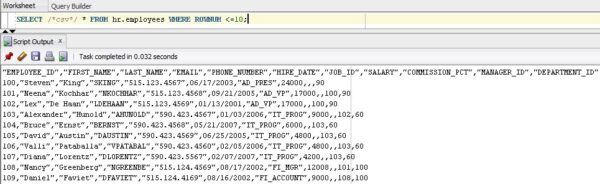
Now you can save this output to a file.
In SQL Developer version 4.1
The new SQL Developer 4.1 function allows you to use the following command without prompting.
SET SQLFORMAT csv
You can now save the output to a file.
You can use the csv hint. See the example above:
select /*csv*/ table_name, tablespace_name
from all_tables
where owner = 'SYS'
and tablespace_name is not null;
The underline parameter removes the underscores under column headers.
set pagesize 50000 -- 50 thousand is the maximum for version 12c.
set linesize 10000
set trimspool on - remove the gaps at the end.
set underline off - remove the accents under the headings
set colsep ~
select * from DW_TMC_PROJECT_VW;
Field values may contain commas and quotes, so some of the suggested variants will not work. To replace single quotes with double quotes inside a field, use the REPLACE function.
set echo off
set heading off
set feedback off
set linesize 1024 -- or some other value, big enough
set pagesize 50,000
set verify off
set trimspool on
spool output.csv
select trim(
'" || replace(col1, '", '") ||
'',' || replace(col2, '', ''') ||
'',' || replace(coln, '', ''') || ''' -- etc. for all fields.
from yourtable
/
spool off
If you want to leave single quotes in field values, use the code below:
set echo off
set heading off
set feedback off
set linesize 1024 -- or some other value, big enough
set pagesize 50,000
set verify off
set trimspool on
spool output.csv
select trim(
'" || replace(col1, ''', ''') ||
'',' || replace(col2, ''', ''') ||
'',' || replace(coln, '''', ''''') || ''' -- etc. for all fields.
from yourtable
/
spool off
If you are using SQL Developer version 12.2, you can simply add
set markup csv on
About Enteros
Enteros offers a patented database performance management SaaS platform. It proactively identifies root causes of complex business-impacting database scalability and performance issues across a growing number of clouds, RDBMS, NoSQL, and machine learning database platforms.
The views expressed on this blog are those of the author and do not necessarily reflect the opinions of Enteros Inc. This blog may contain links to the content of third-party sites. By providing such links, Enteros Inc. does not adopt, guarantee, approve, or endorse the information, views, or products available on such sites.
Are you interested in writing for Enteros’ Blog? Please send us a pitch!
RELATED POSTS
How to Optimize Retail Sector Growth with Enteros Cloud FinOps, RevOps Efficiency, Cost Attribution, Cost Estimation, and AI SQL
- 9 April 2026
- Database Performance Management
Introduction The retail sector is undergoing a rapid transformation driven by eCommerce expansion, omnichannel experiences, AI-powered personalization, and data-driven decision-making. Retailers today operate across multiple platforms—online stores, mobile apps, physical outlets, and global marketplaces—creating highly complex and data-intensive environments. As retail businesses scale, they face a critical challenge:how to drive growth while controlling costs, optimizing … Continue reading “How to Optimize Retail Sector Growth with Enteros Cloud FinOps, RevOps Efficiency, Cost Attribution, Cost Estimation, and AI SQL”
How to Optimize Healthcare Growth Management with Enteros Database Performance and AIOps Platform
Introduction The healthcare sector is rapidly evolving with the adoption of digital technologies such as electronic health records (EHRs), telemedicine, AI-driven diagnostics, and real-time patient monitoring. These innovations are transforming how healthcare providers deliver services, improve patient outcomes, and manage operations. However, as healthcare organizations scale, they face a critical challenge:how to manage growth efficiently … Continue reading “How to Optimize Healthcare Growth Management with Enteros Database Performance and AIOps Platform”
How to Drive eCommerce Revenue Growth with Enteros Growth Management, RevOps Efficiency, and Cloud FinOps
- 8 April 2026
- Database Performance Management
Introduction The eCommerce sector has witnessed explosive growth over the past decade, fueled by digital transformation, mobile shopping, AI-driven personalization, and global online marketplaces. From startups to enterprise retailers, businesses are scaling rapidly to meet rising customer expectations for speed, convenience, and seamless experiences. However, this rapid growth introduces a critical challenge:how to increase revenue … Continue reading “How to Drive eCommerce Revenue Growth with Enteros Growth Management, RevOps Efficiency, and Cloud FinOps”
How to Drive Healthcare Sector Performance Growth with Enteros Database Management and AI SQL Optimization
Introduction The healthcare sector is undergoing a significant digital transformation driven by electronic health records (EHRs), telemedicine, AI-powered diagnostics, and real-time patient monitoring systems. Healthcare organizations are increasingly relying on data to deliver better patient outcomes, improve operational efficiency, and ensure regulatory compliance. However, with the exponential growth of healthcare data comes a major challenge:how … Continue reading “How to Drive Healthcare Sector Performance Growth with Enteros Database Management and AI SQL Optimization”