Preamble

MongoDB Database – Having installed the DB, we can now add data to it. All data is stored in the DB in the BSON format, which is close to JSON, so we also need to enter data in this format.
And although we may not have a single collection at the moment, it is automatically created when we add data to it.
As mentioned earlier, the name of the collection is an arbitrary identifier consisting of no more than 128 different alphanumeric characters and an underscore.
At the same time, the name of the collection shall not start with the prefix system as it is reserved for internal collections (e.g. the collection system.users contains all database users). Also, the name shall not contain the dollar sign – $.
Three of its methods may be used to add to the collection:
- insertOne(): adds a single document
- insertMany(): adds several documents
- insert(): can add both one and several documents
So, let’s add one document:
> db.users.insertOne({"name": "Tom", "age": 28, languages: ["english", "spanish"]})
The document represents a set of key-value pairs. In this case, the document to be added has three keys: name, age, languages, and each of them is matched with a certain value. For example, the key languages are matched with an array as a value.
There are some limitations when using key names:
- The symbol $ cannot be the first character in the key name.
- The key name cannot contain the character of a.
When adding data, if we have not explicitly provided a value for the field “_id” (i.e. a unique document identifier), it is generated automatically. But in principle we can set this identifier ourselves when adding data:
> db.users.insertOne({"_id": 123457, "name": "Tom", "age": 28, languages: ["english", "spanish"]})
It should be noted that the key names can be used in quotes, or maybe without quotes.
If added successfully, the ID of the added document will be displayed on the console.
And to make sure that the document is in dd, we output it using the find function.
> db.users.find()
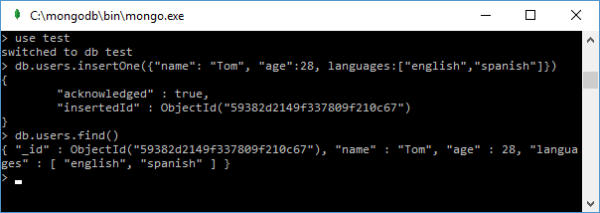
To print in a more readable form let’s add the pretty() method:
db.users.find().pretty()
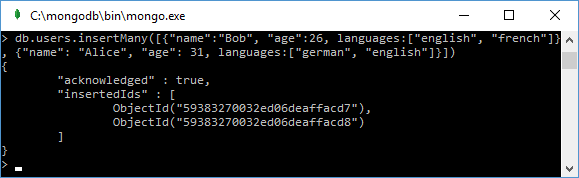
If we need to add some documents, we can use the insertMany() method:
db.users.insertMany([{"name": "Bob", "age": 26, languages: ["english", "frensh"]},
{"name": "Alice", "age": 31, languages:["german", "english"]}])
After adding, the console displays the IDs of the added documents:
And the third method, insert(), demonstrates a more universal way to add documents. When it is called, the document to be added is also passed to it:
db.users.insert({"name": "Tom", "age": 28, languages: ["english", "spanish"]})
When it is called, the number of added entries is displayed on the console:
WriteResult({"nInserted" : 1 })
There is another way to add a document to the database, which includes two steps:
- the definition of the document (document = ( { … } )
- and the actual addition of the document:
If you want, you can also use db.users.find() function to verify that the document is in the database.
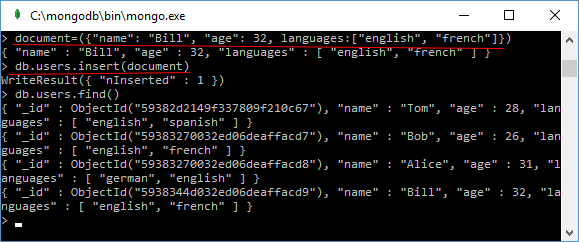
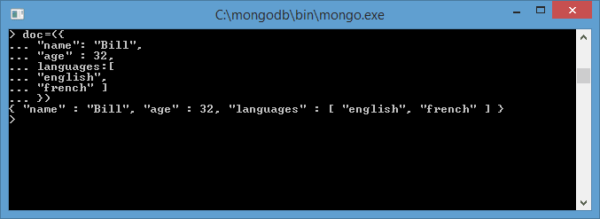
It may not be convenient for everyone to enter all key pairs and properties in one line. But the intelligent MongoDB interpreter based on javascript also allows you to enter multi-line commands.
If the expression is not finished (in terms of JavaScript), and you press Enter, the input of the next part of the expression will be automatically moved to the next line:
Loading data from a file
The data for the mongodb database can be defined in a regular text file, which is quite convenient because we can transfer or forward this file regardless of the mongodb database. For example, let’s define a users.js file somewhere on our hard drive with the following content:
db.users.insertMany([
{"name": "Alice", "age": 31, languages: ["english", "french"]},
{"name": "Lene", "age": 29, languages: ["english", "spanish"]},
{"name": "Kate", "age": 30, languages: ["german", "russian"]}
])
In other words, three documents are added to the user’s collection using the insertMany method.
To load a file into the current database, the load() function is used, in which the path to the file is passed as a parameter:
load("D:/users.js")
In this case, it is assumed that the file is located in the path “D:/users.js”.
MongoDB Tutorial: Insert Data Into MongoDB Database
Enteros
About Enteros
IT organizations routinely spend days and weeks troubleshooting production database performance issues across multitudes of critical business systems. Fast and reliable resolution of database performance problems by Enteros enables businesses to generate and save millions of direct revenue, minimize waste of employees’ productivity, reduce the number of licenses, servers, and cloud resources and maximize the productivity of the application, database, and IT operations teams.
The views expressed on this blog are those of the author and do not necessarily reflect the opinions of Enteros Inc. This blog may contain links to the content of third-party sites. By providing such links, Enteros Inc. does not adopt, guarantee, approve, or endorse the information, views, or products available on such sites.
Are you interested in writing for Enteros’ Blog? Please send us a pitch!
RELATED POSTS
How Do Streaming Services Manage Database Bottlenecks For New Content Releases And Large Live Events?
- 22 September 2026
- Database Performance Management
Streaming platforms can monitor SQL workloads, query latency, transaction volume, resource usage, database waits, locking, and sudden workload changes to avoid database bottlenecks during major live events and content releases. Effective streaming database performance monitoring empowers IT teams to identify performance risks earlier, optimise inefficient queries, plan capacity, and deliver reliable user experiences in times … Continue reading “How Do Streaming Services Manage Database Bottlenecks For New Content Releases And Large Live Events?”
How Do Hospitals Stop Databases From Slowing Down At Emergency and High Patient Admission Times?
Hospitals can avoid database slowdowns during emergency and high-volume admission periods with continual monitoring of SQL workloads, transaction latency, database waits, locking, utilization of resources, connection levels and sudden workload changes. By effectively monitoring hospital database performance, healthcare IT teams can detect bottlenecks sooner, optimize inefficient queries, plan capacity, and maintain reliable access to vital … Continue reading “How Do Hospitals Stop Databases From Slowing Down At Emergency and High Patient Admission Times?”
How Can Banks Prevent Database Slowdowns During High Transaction Volumes?
- 21 September 2026
- Database Performance Management
Banks can protect bank database performance during high transaction volumes by monitoring SQL latency, throughput, locks, waits, CPU, memory, storage I/O, and workload changes continuously. Strong banking database performance also depends on optimizing high-impact queries, establishing baselines, detecting anomalies early, analyzing root causes, and forecasting capacity before demand exceeds available resources. Why Does Bank Database … Continue reading “How Can Banks Prevent Database Slowdowns During High Transaction Volumes?”
How Can Telecom Companies Improve Database Performance and Keep Networks Running Smoothly?
By regularly tracking SQL workloads, query latency, database waits, resource utilisation, locking, and capacity trends, telecom businesses can enhance the performance of their databases. Telecom teams may identify bottlenecks early, minimise service interruption, and maintain dependable customer-facing systems with the use of efficient database performance monitoring. Enteros facilitates proactive performance management by utilising analytics, root … Continue reading “How Can Telecom Companies Improve Database Performance and Keep Networks Running Smoothly?”