Preamble
Terminal server – a device that provides remote access to the desktops and delegates computing resources to the end user. It is used with specialized software that supports the ability to work through a remote session. In 2020, the technology remains relevant, as it allows saving and getting the maximum benefit.
The time has come to learn more about the terminal server, because the use of such hardware and software complex is widespread. Sometimes it is easier to make one productive unit and create a dozen desktops with remote access than to apply a lot of personal computers that complicate service and administration.
Terminal Server Destination
Consider the following scenario. The company has ten employees, and they must use Word, Excel, send mail, and process orders in CRM. Sometimes an interface to work with 1C is required. Of course you could buy a PC for every employee, but what kind of investments would that entail? At the same time, Windows will need to be installed on your computer for routine maintenance. Some difficulties.
There is a less complicated approach to the issue:
- establish a central node that will serve as a terminal server;
- allow the end user access to it;
- allocate exactly as much power as is needed to solve the problem.
As you can see, the terminal server allows you to solve the problem simply and uncomplicatedly. Install one productive server, create 10 accounts for employees, put thin clients and give access to the TC. Just keep in mind that the next one is required in sufficient amounts:
- network channel;
- processor resources;
- the amount of RAM;
- disk memory.
As you can see, there are a minimum number of factors to consider, but other problems may arise – licenses. There is an approach here that allows you to save a lot of money if you decide to act legally. I will tell you about them at the end of the article.
Technology
Depending on the number of users, operating system, and software requirements, different devices will be needed. We’ll progress from basic to complex. Let’s start with the requirements for the software.
The kind of guest sessions will determine this. For each desktop, for instance, it could start a different process that would use the specified number of computing resources, as was the case with Adobe Acrobat. Each remote desktop required its own rendering at page display, 2D graphics acceleration, and different kinds of antialiasing, which significantly reduced productivity.
The second type occurs when different sessions are created within a single application rather than providing terminal access by running separate desktops. For instance, this is how web servers that use the same operating system but create various sessions within themselves are constructed.
So, first and foremost, you must determine how much resource will be consumed by a separate process. Actually, you’ll need to calculate how much each desktop will use. It’s a fairly challenging exercise.
The operating system is the subject at hand right now. It is generally challenging to answer this question within the context of the article; there are dozens of operating systems, the most popular of which are:
- Unix-like ones, the most popular of which refer to the Linux subtype;
- Windows, including the server versions;
- BSD, also a UNIX-like system, but has undergone enormous changes;
- many others, such as those that were written by themselves and were specific to given tasks.
Each OS will have different options for providing terminal access as well as its own set of specifications. The type of operating system will have a significant impact on the device requirements.
for a snack, too. The most crucial factor is the total number of users because the total number of one-time sessions will determine the terminal server’s final specifications. Each individual has the potential to be a remote desktop. When building a technical infrastructure, you will need to take this into consideration.
Requirements for the terminal server
Did you notice what you must deal with? OK, excellent. I hope you understand that I can’t reveal every possible assembly for every job. Only the ones I’ve implemented on my own will tell me. But I’ve always run into a few problems that need to be addressed.
It is always preferable to assign a separate processor thread for each desktop when designing a terminal server. For instance, it is advised to use a CPU with at least 10 cores and 20 threads if you have 20 users. But it depends on application requirements. It’s okay if it’s a small office with a few workers in it. Additionally, if the men are constantly working on programming projects and launching compilers, each worker can consume a lot of resources.
If they work hard with the file system on the terminal server, the disk subsystem is a weak point. For instance, if users are running various applications that are all located on the same disk. Install SSDs, use RAID, and distribute applications among several drives. Make sure that one HDD is not clogged with a lot of calls.
RAM. Setting two 32 GB slats is a bad idea if 64 GB is needed for all drives. It is ideal that the RAM is also smashed and that there are not too many calls to the bar. Break it down into 16 GB; this will increase its dependability. But take into account the most connectors possible. If there are only four of them and the plans include 128 GB, you must limit yourself to 32 GB.
That network board. Extremely serious issue! Why? Because 1 GbE is simply insufficient for a large number of connections. Because they are not parallel, not because the channel is clogged. This is a serious problem. Take boards with independent channel support, and then you can avoid problems. 2, or better yet 4.
Instead, use hot-swappable power supply units; otherwise, if one fails, the device will be de-energized. Remember to take a good uninterruptible power supply. It will give you time to finish the task normally and save all the data if it is de-energized. The rest is at your discretion. I can, however, make a few full assemblies that you can order. On the basis of Supermicro, I’ll take all necessary measures to prevent overpayments. I won’t say how much because it fluctuates like hope from a skyscraper.
Thin customer
In what capacity do you require the terminal server? That’s right, any gadget capable of handling data input and output:
- an old computer;
- a tablet;
- monoblock;
- a specific gadget.
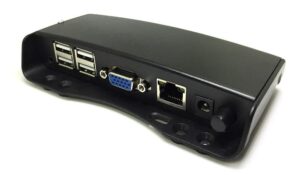
A thin client can generally be anything that allows you to access the terminal session. For this purpose, specialized “boxes” with low computing power are frequently bought. They merely read and send the input data and display the data on the monitor. I’m done. They do not independently process information. But because the device cannot process graphics independently in this situation, a video card must be installed on the server.
Fat client
The one that resembles a dusty PC, not the one that just arrived. Yes, the terminal server and nostalgic client work together to complete tasks. For instance, the thick client will be in charge of the graphical display while the server will handle data processing.
Licenses
Now for the important part. There is a slight difference in licensing for the terminal server. On the one hand, it might be advantageous, but on the other, it is not. Let’s examine the typical license types for this kind of technological infrastructure:
For how many workstations there are. Not the most advantageous option, after all, it turns out that employees can number in the tens and work with the application at the same time. You can choose a different person for each workplace if everyone turns in their work without fail.
In relation to the user base. In other words, the license allows a specific number of unique users. There will be no more cans; there will be fewer cans. If employees use the software only periodically and one by one, you get a very profitable option. But with separate PCs, this option will not work anymore.
By how many connections there are. Very uncommon licenses, which I haven’t seen in person yet, operate on a similar principle, but they have a limit on the number of one-time sessions.
So, if you want to save money on software and don’t want to install it on each computer separately, you can save a lot of money by using a terminal server.
Build
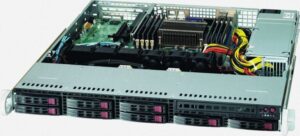
The first one will be the easiest. Office applications, 1C terminal access, and a few dozen staff members who can use the browser are all included. Please be aware that this server only serves applications. It is not sharpened in the database configuration.
Variant 1
Platform: Supermicro 1017R-MTF, 1U form factor;
Intel Xeon processor E5-1650 v4;
2 Samsung MZ-7KE256BW SATA SSDs on 256GB;
4 HDD SATA 1TB
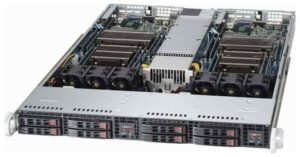
What if 50 people were performing the same tasks at once, destroying the method? Well, there’s a need for assembly. Even if the application requirements aren’t particularly stringent, the crowd is the crowd.
Variant 2
Platform: Supermicro 1027TR-TF, 1U form factor;
2 Intel Xeon E5-E5-2697 v4 processors;
4 Samsung MZ-7KE256BW SATA SSDs on 256GB
4 HDD SATA 1TB.
The rest is left to discretion.
What if it’s 100? Then it becomes more enjoyable. We must leave this situation immediately.

Variant 3
Platform: Supermicro 2029UZ-TR4 +, form factor 2U;
2 new Intel® Xeon® Gold 5220 Processors;
4 Samsung MZ-V7P512BW NVMe SSDs on 512GB
4 HDD SATA 2TB;
The rest at your discretion.
Assembly fun is prepared. Any terminal server is, in fact, a unique project. So it’s preferable to work in accordance with your objectives.
About Enteros
Enteros offers a patented database performance management SaaS platform. It finds the root causes of complex database scalability and performance problems that affect business across a growing number of cloud, RDBMS, NoSQL, and machine learning database platforms.
The views expressed on this blog are those of the author and do not necessarily reflect the opinions of Enteros Inc. This blog may contain links to the content of third-party sites. By providing such links, Enteros Inc. does not adopt, guarantee, approve, or endorse the information, views, or products available on such sites.
Are you interested in writing for Enteros’ Blog? Please send us a pitch!
RELATED POSTS
Cloud FinOps for Healthcare: How Enteros Database Software and AI SQL Drive RevOps Efficiency
- 19 March 2026
- Database Performance Management
Introduction The healthcare industry is undergoing a rapid digital transformation driven by electronic health records (EHRs), telemedicine, AI-powered diagnostics, patient engagement platforms, and real-time data analytics. Hospitals, healthcare providers, and life sciences organizations are increasingly relying on data-intensive applications and cloud-based infrastructure to deliver high-quality care and operational efficiency. At the heart of these systems … Continue reading “Cloud FinOps for Healthcare: How Enteros Database Software and AI SQL Drive RevOps Efficiency”
Database Optimization for Finance: How Enteros AI SQL and AIOps Enable Cloud FinOps Efficiency
Introduction The financial sector is undergoing a profound digital transformation driven by cloud adoption, real-time data processing, AI-powered analytics, and customer-centric digital services. From online banking and trading platforms to fraud detection systems and regulatory reporting engines, modern financial institutions depend heavily on high-performance database environments. As these systems scale, they introduce a dual challenge:How … Continue reading “Database Optimization for Finance: How Enteros AI SQL and AIOps Enable Cloud FinOps Efficiency”
Cost Attribution for Marketing Platforms: How Enteros AI SQL and AIOps Deliver Data Intelligence
- 18 March 2026
- Database Performance Management
Introduction The marketing sector has evolved into one of the most data-intensive domains in modern business. From digital advertising and customer segmentation to real-time personalization and omnichannel campaigns, marketing platforms today rely on complex technology ecosystems powered by massive volumes of data. Every click, impression, conversion, and interaction generates data that must be processed, analyzed, … Continue reading “Cost Attribution for Marketing Platforms: How Enteros AI SQL and AIOps Deliver Data Intelligence”
How Media Platforms Optimize Growth Management with Enteros Performance Management and Cost Attribution
Introduction The media industry has undergone a massive transformation in the past decade. From traditional broadcasting to digital-first ecosystems, media platforms now operate in a world driven by streaming services, real-time content delivery, personalized recommendations, and global audience engagement. Whether it’s video streaming, music platforms, online publishing, or digital advertising networks, modern media organizations rely … Continue reading “How Media Platforms Optimize Growth Management with Enteros Performance Management and Cost Attribution”