Preamble
Before starting to create an SQL table, it is necessary to define the database model. Design an ER diagram in which to define the entities, attributes, and relationships.
Basic concepts
Essences – objects or facts, information about which should be kept. For example, an employee of a company or project implemented by the company. Attributes – a component that describes or qualifies an entity. For example, an attribute of an entity “employee” – salary and attribute of an entity “project” – estimated value.
Links – associations between two elements. It may be bidirectional. There is also a recursive connection, i.e. the connection of the entity with itself.
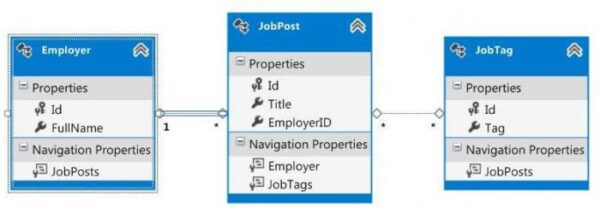
It is also necessary to define the keys and conditions under which the database integrity will be preserved. What does it mean? In other words, it means the constraints that will help keep the databases in a correct and consistent form.
The transition from the ER-diagram to the tabular model
Rules of transition to a tabular model:
- Convert all entities into tables.
- Convert all attributes into columns, i.e. each attribute of an entity must be displayed in the column name of the table.
- Convert unique identifiers to primary keys.
- Convert all relations into external keys.
- Create an SQL table.
Creating the Base
First, you need to run the MySQL server. To start it, go to the Start menu, then to Programs, then to MySQL and MySQL Server, select MySQL-Command-Line-Client.
The Create Database command is used to create a database. This function has the following format:
CREATE DATABASE Database_name
- The restrictions on the database name are as follows: the length is up to 64 characters and may include letters, digits, ” and “;
- the name may start with a digit but must contain letters.
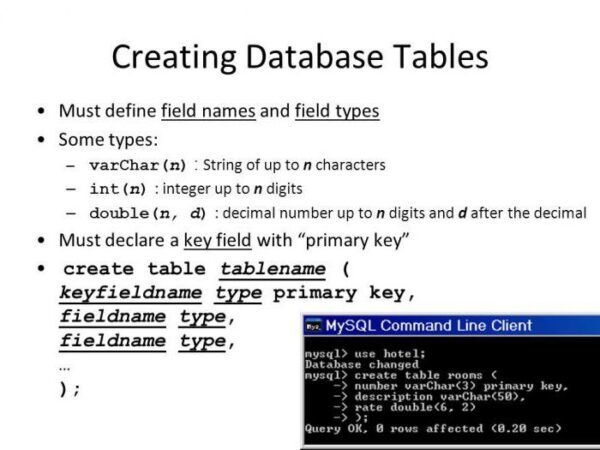
You should also remember the general rule: any query or command ends with a delimiter. In SQL it is common to use a semicolon as a delimiter. The server shall specify which database it shall work with. The USE operator shall be used for this purpose. This operator has a simple syntax:
USE name_database_data
Create an SQL table
So, the model is designed, the database is created and the server is instructed how to work with it. Now you can start creating SQL tables. There is a data definition language (DDL). It is used to create an MS SQL table, and also to define objects and work with their structure. DDL includes a set of commands.
SQL Server to create a table
Using only one DDL command, you can create different database objects by varying its parameters. The Create Table command is used to create an SQL table. The tt format is as follows:
CREATE TABLE name_table, (column_name1 data type [DEFAULT expression] [column_limit], column_name2 data type [DEFAULT expression] [column_limit], [table_limit])
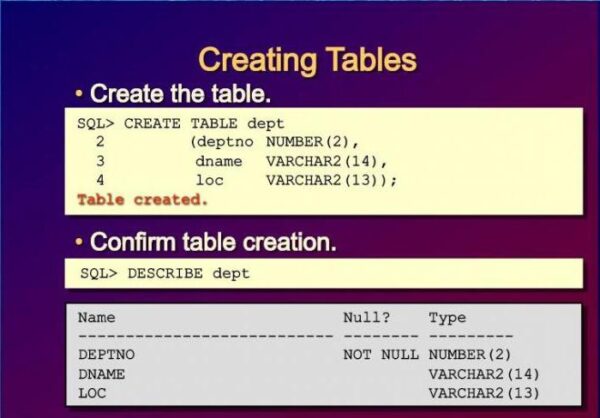
The syntax of this command should be described in more detail:
- The name of the table must be up to 30 characters long and start with a letter. Only characters of the alphabet, letters, and “_”, “$” and “#” are allowed. Cyrillic characters are allowed. It is important to note that the table names shall not coincide with the names of other objects and the reserved words of the database server, such as Column, Table, Index, etc.
- The data type shall be specified for each column. There shall be a standard set used by the majority. For example, Char, Varchar, Number, Date, Null type, etc.
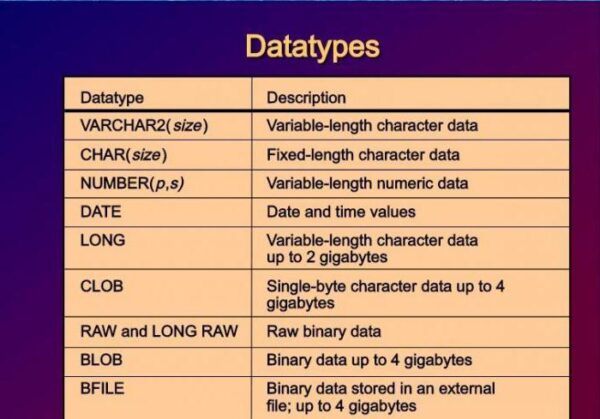
- With the Default parameter, you can set the default value. This ensures that there are no undefined values in the table. What does it mean? The default value can be a symbol, an expression, a function. It is important to remember that the type of these defaults should be the same as the type of data entered in the column.
- Restrictions on each column are used to implement integrity conditions for data at the table level. There are other nuances. It is forbidden to delete a table if there are other tables dependent on it.
How to work with the database
Large projects often require the creation of several databases, and each requires many tables. Of course, it is impossible for users to keep all information in their heads. For this purpose, there is an option to view the structure of databases and tables in them. There are several commands, namely:
- SHOW DATABASES – shows all created SQL databases on the screen;
- SHOW TABLES – displays the list of all tables for the current database, which are selected by the USE command;
- DESCRIBE name_table – displays the description of all columns in the table;
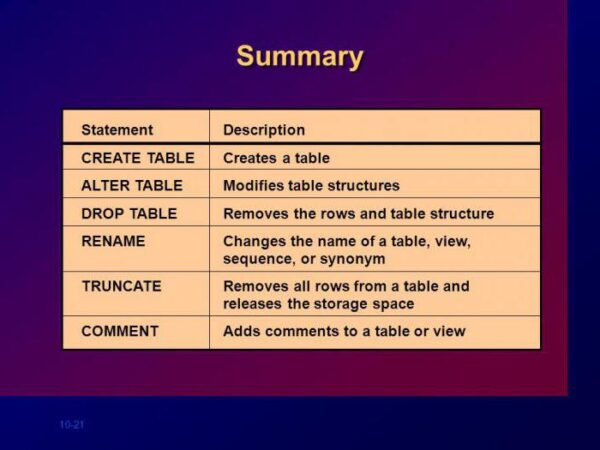
- ALTER TABLE – allows you to change the table structure.
The last command enables you to: add a column or a restriction to the table; change an existing column; delete a column or columns; delete integrity restrictions. The syntax of this command looks like this:
ALTER TABLE column_name { [ADD column_name or restriction] | [MODIFY column_name] | [DROP column_name_removeable_limit] | [{ENABLE | DISABLE} CONSTANT name_limit ] | }.
There are other commands as well:
- RENAME – rename the table
- TRUNCATE TABLE – removes all rows from the table. This function may be needed when you need to fill the table anew and there is no need to store the previous data.
There may also be situations when the database structure has changed and the table shall be deleted. The DROP command shall be used for this purpose. Of course, you shall first select the database from which the table shall be deleted if it differs from the current one.
The syntax of the command is quite simple:
DROP TABLE name_table
In SQL Access, creating tables and modifying them is done with the same commands listed above.
With CREATE TABLE you can create an empty table and fill it with data later on. But that’s not all. You can also immediately create a table from another table. How does it work? In other words, you can define a table and fill it with data from another table. For this purpose, there is a special keyword AS.
The syntax is very simple:
CREATE TABLE name_table [(column_definition)] AS subquery;
- column_definition – column names, integrity rules for columns of the newly created table and default values;
- subquery – returns the rows to be added to the new table.
Thus, this command creates a table with specific columns, inserts rows that are returned in the query.
Time tables
Temporary tables are tables in which data is erased at the end of each session or earlier. They are used to record intermediate values or results. They can be used as worksheets.
Temporary tables can be defined in any session, and their data can only be used in the current session. Creation of temporary SQL tables is similar to the usual one, using the CREATE TABLE command. To show the system that a table is temporary, you need to use the GLOBAL TEMPORARY option.
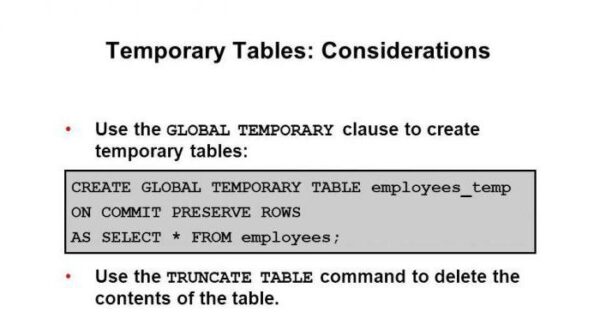
The ON COMMIT offer sets the lifetime of data in such a table and can perform the following actions:
- DELETE ROWS – clear the temporary table (delete all session data) after each end of the transaction. Usually this value is used by default.
- PRESERVE ROWS – leave data to use in the next transaction. In addition, you can clear the table only after the end of the session. But there are features. If there is a rollback of a transaction (ROLLBACK), the table will be returned to the end of the previous transaction.
The syntax for creating a temporary table can be represented in this way:
CREATE [GLOBAL TEMPORARY] TABLE name_table, (column_name1 data type [DEFAULT expression] [restriction_column], column_name2 data type [DEFAULT expression] [restriction_column], [restriction_table]).
About Enteros
IT organizations routinely spend days and weeks troubleshooting production database performance issues across multitudes of critical business systems. Fast and reliable resolution of database performance problems by Enteros enables businesses to generate and save millions of direct revenue, minimize waste of employees’ productivity, reduce the number of licenses, servers, and cloud resources and maximize the productivity of the application, database, and IT operations teams.
The views expressed on this blog are those of the author and do not necessarily reflect the opinions of Enteros Inc. This blog may contain links to the content of third-party sites. By providing such links, Enteros Inc. does not adopt, guarantee, approve, or endorse the information, views, or products available on such sites.
Are you interested in writing for Enteros’ Blog? Please send us a pitch!
RELATED POSTS
Reducing Cloud Infrastructure Waste in BFSI with AIOps, FinOps, and Database Analytics
- 25 August 2026
- Database Performance Management
Introduction Banking, Financial Services, and Insurance (BFSI) organizations are rapidly adopting cloud infrastructure to support digital banking, payments, lending, insurance, fraud detection, financial analytics, and customer-facing applications. Cloud technology provides the scalability and flexibility needed to deliver always-on financial services, but it also creates a growing challenge: how can BFSI organizations control infrastructure waste without … Continue reading “Reducing Cloud Infrastructure Waste in BFSI with AIOps, FinOps, and Database Analytics”
How AI-Driven FinOps and AIOps Improve Performance Across Banking Cloud Environments
Introduction The banking industry is rapidly transitioning from traditional infrastructure models toward cloud-native, hybrid, and multi-cloud environments. Digital banking applications, payment platforms, lending systems, customer portals, fraud detection platforms, and financial analytics increasingly depend on cloud infrastructure to deliver scalable and reliable services. This transformation provides banks with greater flexibility, but it also introduces a … Continue reading “How AI-Driven FinOps and AIOps Improve Performance Across Banking Cloud Environments”
How to Optimize Telecom Database Infrastructure with Enteros Database Software, AIOps, and Cloud FinOps
Introduction Telecommunications companies operate some of the most complex technology environments in the world. Subscriber management, billing, charging, network inventory, service provisioning, CRM, usage analytics, 5G, IoT, edge computing, and digital customer platforms all generate massive database workloads. As telecom operators expand 5G, cloud-native architectures, edge computing, and AI, the amount and complexity of data … Continue reading “How to Optimize Telecom Database Infrastructure with Enteros Database Software, AIOps, and Cloud FinOps”
Building Resilient BFSI Applications with Predictive AIOps and FinOps Intelligence
- 23 August 2026
- Database Performance Management
Introduction The Banking, Financial Services, and Insurance (BFSI) industry is undergoing a rapid digital transformation. Mobile banking, digital payments, online lending, insurance platforms, wealth management applications, and real-time financial services now depend on highly available and scalable IT infrastructure. Customers expect BFSI applications to be fast, secure, and available around the clock. Even a short … Continue reading “Building Resilient BFSI Applications with Predictive AIOps and FinOps Intelligence”