Preamble
SQL Server has an interesting feature called Linked Servers. It is about linking other databases to SQL Server and using their data as local. There are many powerful open source systems written in PHP, and they mainly use MySQL as a database.
This blog post shows how to link a MySQL database to SQL Server and how to use a linked server in SQL queries.
What is a linked server?
A linked server in MSSQL is some other database server connected to this one, which allows querying and manipulating data in other databases. For example, we can link some MySQL database to MSSQL and use it almost like any other MSSQL database.
For more details, you can learn more about how to create a linked server (Linked Server) in Microsoft SQL Server.
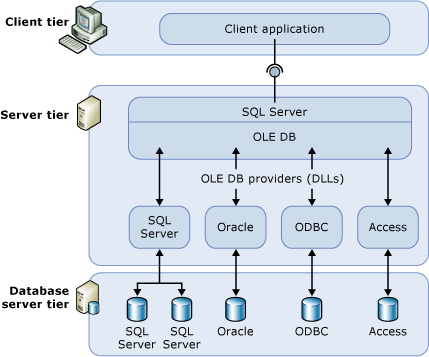
Although communication with related servers is done through OLE DB vendors, there is also an OLE DB vendor for ODBC, and we can use it if there is no OLE DB vendor in our external database.
A linked server is available for the entire SQL Server instance. This means that all SQL Server databases can use a linked server to obtain data.
Linking MySQL to SQL Server
Adding a linked server and configuring connection parameters is not always easy and clear.
To bind MySQL to SQL Server, I had to create an ODBC DSN for MySQL (we called it MySQLCrm). Before proceeding to the next steps, make sure that the ODBC data source works.
Perform the following steps to associate MySQL with SQL Server:
- Run SQL Server Management Studio (SSMS)
- Connect to your server
- Expand the node Server objects from the tree to the left
- Right-click on related servers
- Select a new bound server
You should see the next dialog (or slightly different, but the idea remains the same).
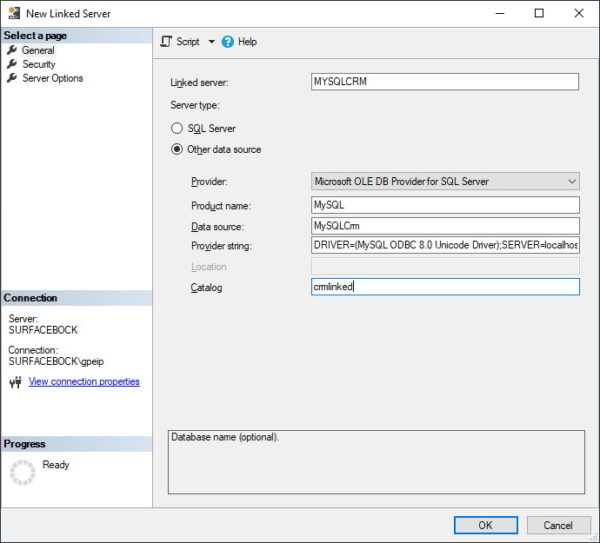
Pay special attention to what you insert into this dialog. We have made the link work with this set of data. We tried different values, and if something is wrong by one millimeter, the connection is not established. This is a very damn sensitive dialog.
The connection string to a MySQL database should be like the one shown here:
DRIVER=(MySQL ODBC 8.0 Unicode Driver); SERVER=localhost; PORT=3306; DATABASE=crmlinked; USER=crmuser; PASSWORD=crm_user_password; OPTION=3;
Also pay attention to OPTION = 3 – without this we only get errors when connecting to the linked server.
Try saving by clicking OK and see if you can move to the linked server. If you receive errors, right click on the server and select the properties. Leaving the dialog open, go to the server options page. Set the RPC and RPC Out parameters to True.
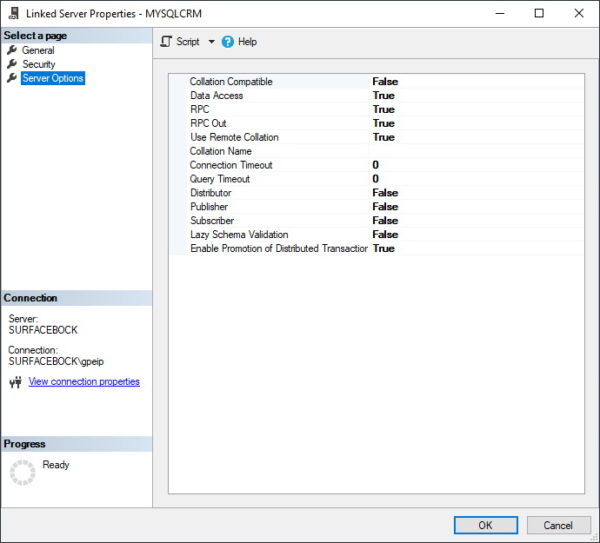
We’re still not quite sure what these options do, but some of those who had trouble communicating with MySQL made it work after setting RPC to true.
For the query to really work, we need one more small change that affects the entire OLE DB vendor and therefore all the connections that use it. Open the “Vendors” node in the “Linked Servers” section, right-click MSDASQL (this is the OLE DB Vendor for ODBC data sources) and select the properties.
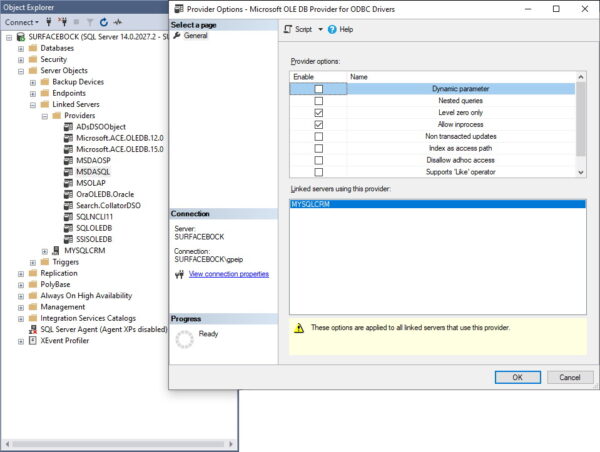
Select the check box only before Level Zero and click OK to save your changes.
Request data from a linked server
Querying related databases is really easy. Here is a table of clients from a crmlinked database in MySQL. This database is linked to my SQL Server.
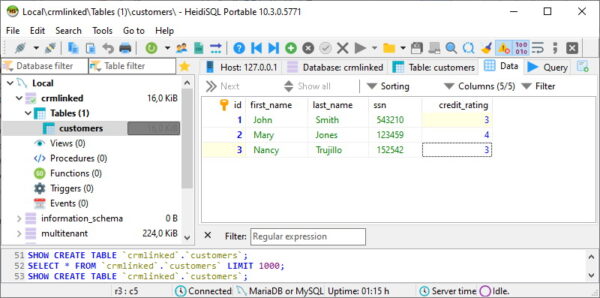
The syntax of queries to the associated server is a bit different from what we normally write in SQL Server.
We need to use names from four parts: server.database.schema.table. Since there are no schemas in MySQL and the connection string contains the name of the database, we can leave them as shown here.
select * from MYSQLCRM...customers
Executing this request from SSMS gives the following conclusion. This is the same data as in MySQL client table.
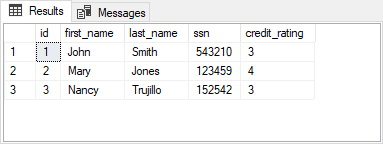
Of course, we can also write more complex requests. All that ODBC can handle is good.
Mixing data from the local and associated server
The tables from the linked server are not completely isolated from the local database tables and views. We can also mix data from the local and linked servers.
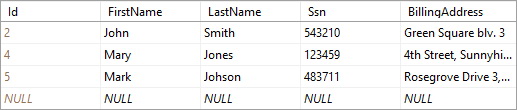
To demonstrate a mixed query for local and linked tables, let’s write a simple query to get all clients from the local table and their credit ratings from the linked table.
SELECT
c.FirstName,
c.LastName,
crm_c.credit_rating as CreditRating
FROM
Customers c
LEFT JOIN MYSQLCRM...customers crm_c ON
c.ssn = crm_c.ssn
ORDER BY
crm_c.credit_rating,
c.LastName,
c.FirstName
Executing this query gives us the following conclusion.
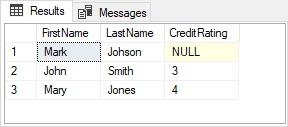
Since Mark is not in the MySQL database (let’s say he’s a new customer in an online store and the sales department doesn’t have him in their CRM system yet), he doesn’t have a credit rating. In this case, John and Mary’s credit ratings are based on MySQL.
Using OPENQUERY() to execute a query on a linked server
In the above examples, all data processing is performed on SQL Server. This can be very suboptimal if there is a lot of data in the tables of linked servers. We may want – or usually want – to process some data on a linked server before SQL Server starts local processing. For this we have OPENQUERY().
Here is an example of using the OPENQUERY() function in a mixed query. We have to specify the name of the linked server and the SQL query to run on the linked server when OPENQUERY() is called. The red query is executed on a MySQL server and the results are read on SQL Server for further processing.
SELECT
c.FirstName,
c.LastName,
crm_c.credit_rating as CreditRating
FROM
Customers c
LEFT JOIN OPENQUERY(MYSQLCRM, '
SELECT
c.credit_rating
FROM
customers p
left join loyalty_points lp on
c.customer_id = lp.customer_id
WHERE
lp.points > 2500
') crm_c ON
c.ssn = crm_c.ssn
ORDER BY
crm_c.credit_rating,
c.LastName,
c.FirstName
OPENQUERY() is a great way to optimize and speed up mixed requests by executing more complex queries to related server data on the related server.
Finish
Linked Servers is a powerful SQL Server feature that makes it easy for us to use data from external servers. There are two ways to write queries using data from linked servers: direct queries, which perform all processing on SQL Server, and OPENQUERY(), which allows us to perform some processing on a remote server.
A linked server is an integration, so its use requires special care. Planning and performance measurement must be mandatory when planning the use of a linked server.
About Enteros
Enteros offers a patented database performance management SaaS platform. It proactively identifies root causes of complex business-impacting database scalability and performance issues across a growing number of clouds, RDBMS, NoSQL, and machine learning database platforms.
The views expressed on this blog are those of the author and do not necessarily reflect the opinions of Enteros Inc. This blog may contain links to the content of third-party sites. By providing such links, Enteros Inc. does not adopt, guarantee, approve, or endorse the information, views, or products available on such sites.
Are you interested in writing for Enteros’ Blog? Please send us a pitch!
RELATED POSTS
Building Resilient BFSI Applications with Predictive AIOps and FinOps Intelligence
- 23 August 2026
- Database Performance Management
Introduction The Banking, Financial Services, and Insurance (BFSI) industry is undergoing a rapid digital transformation. Mobile banking, digital payments, online lending, insurance platforms, wealth management applications, and real-time financial services now depend on highly available and scalable IT infrastructure. Customers expect BFSI applications to be fast, secure, and available around the clock. Even a short … Continue reading “Building Resilient BFSI Applications with Predictive AIOps and FinOps Intelligence”
How AIOps and FinOps Enable Smarter Cloud Cost Optimization in Banking
Introduction Banking has entered an era where cloud technology is central to digital transformation. Mobile banking applications, digital payments, online lending, fraud detection, open banking APIs, wealth management platforms, and real-time financial services all depend on highly available and scalable IT infrastructure. Cloud adoption gives banks the flexibility to scale resources as demand changes, but … Continue reading “How AIOps and FinOps Enable Smarter Cloud Cost Optimization in Banking”
How to Improve Insurance Operations with Enteros Database Software, AI-Powered Analytics, and Database Observability
Introduction Insurance companies operate some of the most data-intensive business processes in the financial services industry. Policy administration, underwriting, claims, billing, customer portals, fraud detection, actuarial analysis, and regulatory reporting all depend on reliable data infrastructure. The insurance industry is also undergoing rapid digital transformation. Customers increasingly expect instant policy quotes, digital claims, mobile applications, … Continue reading “How to Improve Insurance Operations with Enteros Database Software, AI-Powered Analytics, and Database Observability”
How to Optimize Healthcare Database Performance with Enteros Database Software, AI-Powered Analytics, and Database Observability
Introduction Healthcare organizations are becoming increasingly dependent on digital infrastructure. Electronic Health Records (EHRs), patient portals, telemedicine platforms, medical imaging, laboratory systems, pharmacy applications, revenue cycle systems, payer platforms, and AI-powered clinical applications all rely on databases to deliver information quickly and reliably. As healthcare organizations consolidate data and move more workloads to cloud and … Continue reading “How to Optimize Healthcare Database Performance with Enteros Database Software, AI-Powered Analytics, and Database Observability”