What is PostgreSQL array?

In PostgreSQL we can define a column as an array of valid data types. The data type can be built-in, custom or enumerated. In addition, arrays play an important role in PostgreSQL.
Each corresponding PostgreSQL data type is supplied with a corresponding array type. For example, an integer data type has the integer [] array type, a character data type has the character [] array type, etc.
PostgreSQL arrays creation
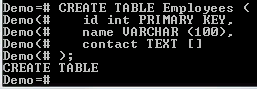
In the following example we will create a table with the name Employees, the contact column of which is defined as a text array:
CREATE TABLE Employees (
id int PRIMARY KEY,
name VARCHAR (100),
contact TEXT []
);
The team must work successfully

Inserting PostgreSQL array values
Let’s now paste the values into the table above:
INSERT INTO Employees
VALUES
(
1,
'Alice John',
ARRAY [ '(408)-743-9045',
'(408)-567-7834' ]
);
The insertion must be successful.
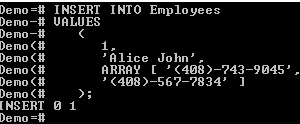
The values of the third column, i.e. the contact, have been inserted as an array. This was achieved with the ARRAY constructor.
In this example, we put them in square brackets []. We have two contacts for the employee Alice John.
We can still use curly brackets {}, as shown below:
INSERT INTO Employees
VALUES
(
2,
'Kate Joel',
'{"(408)-783-5731"}'
),
(
3,
'James Bush',
'{"(408)-745-8965","(408)-567-78234"}'
);
The command must be executed successfully.
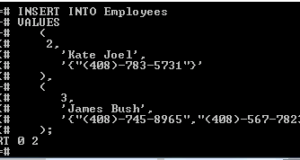
The above operators will insert two rows in the Employees table. When using curly braces, the array is enclosed in single quotes (‘), and the text array elements are enclosed in double quotes (‘).
Array data query
We use the SELECT operator to query array elements.
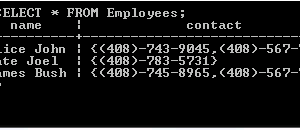
To see the contents of the “Employees” table, we run the following command:
SELECT * FROM Employees;
This returns the following:
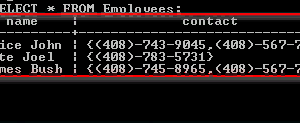
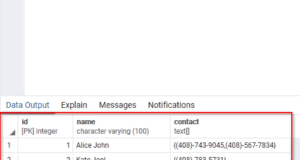
The elements of the array column, that is contact, are enclosed in curly brackets {}.
To access the elements of the array themselves, we will add a lower index in square brackets []. The first element in the array is at position 1.
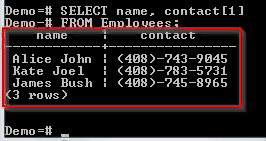
For example, we need to get the names of the employees and only their first contact for those employees who have more than one contact. We can access this as a contact [1].
Let us have a look at this:
SELECT name, contact[1]
FROM Employees;
This will return the following:
We can use the SELECT statement together with the WHERE proposal to filter rows based on an array column.
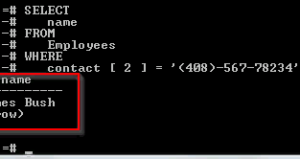
For example, to see an employee with (408) -567-78234 as a second contact, we can execute the following command:
SELECT
name
FROM
Employees
WHERE
contact [ 2 ] = '(408)-567-78234';
This will return the following:
Modification of PostgreSQL array
You can update all or one array element.
Here is the content of the “Employees” table:
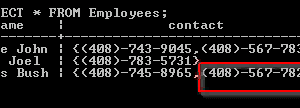
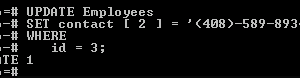
Let’s update the second phone number of James Bush employee with ID 3:
Run the following command:
UPDATE Employees
SET contact [ 2 ] = '(408)-589-89347'.
WHERE
id = 3;
The team must work successfully:
Let’s request a table to check if the change was successful:
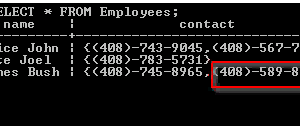
The change was successful.
Search in PostgreSQL array
At present, our employee table looks like this:
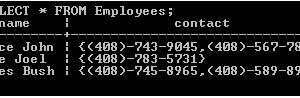
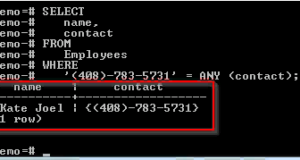
Suppose we need to know who the contact (408) -783-5731 belongs to, regardless of the position in the contact array, we can use the ANY function (), as shown below:
SELECT
name,
contact
FROM
Employees
WHERE
'(408)-783-5731' = ANY (contact);
This will return the following:
Widening arrays
We can break down the values of the array into rows. This process is known as an array extension.
In the Employees table example, there are several employees with two contacts in the contacts array. We can divide them into separate rows.
PostgreSQL provides an unnest () function that you can use to do this.
For example:
SELECT
name,
unnest(contact)
FROM
Employees;
This will return the following:
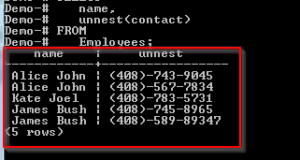
Employees Alice John and James Bush have two contacts. We can break them down into separate lines.
Using pgAdmin
PostgreSQL arrays creation
To do the same with pgAdmin, do it:
Step 1) Log in to your pgAdmin account.
Step 2) From the navigation bar on the left – press rbases.
Click on the Demo button
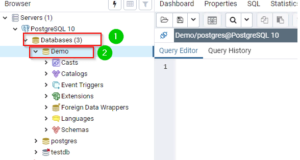
Step 3) Enter a query in the query editor to create the “Employees” table:
CREATE TABLE Employees (
id int PRIMARY KEY,
name VARCHAR (100),
contact TEXT []
);
Step 4) Click the “Run” button.
Inserting PostgreSQL array values
Step 1) Enter the following query in the query editor:
INSERT INTO Employees
VALUES
(
1,
'Alice John',
ARRAY [ '(408)-743-9045',
'(408)-567-7834' ]
);
Step 2) Click the “Run” button:
Step 3)
Use curly brackets in query
Step 1) Enter the following query in the query editor:
INSERT INTO Employees
VALUES
(
2,
'Kate Joel',
'{"(408)-783-5731"}'
),
(
3,
'James Bush',
'{"(408)-745-8965","(408)-567-78234"}'
);
Step 2) Click the “Run” button:
Array data query
Step 1) To view the contents of the “Employees” table, enter the following query in the query editor:
SELECT * FROM Employees;
Step 2) Click the “Run” button:
It should return the following request:
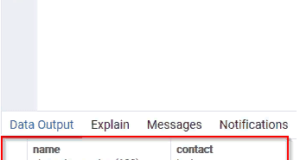
Step 3) To see the first contacts of your employees:
Enter the next query in the query editor:
SELECT name, contact[1]
FROM Employees;
Click the Run button.
It should return the following:
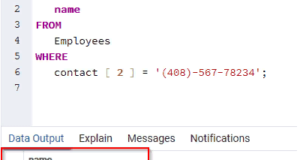
Step 4) To combine the SELECT operator with the WHERE proposal:
Enter the following command in the query editor:
SELECT .
name
FROM
Employees
WHERE
contact [ 2 ] = '(408)-567-78234';
Click the Run button.
It should return the following:
Modification of PostgreSQL array
Step 1) To update the user’s second contact with ID 3, execute the following command:
UPDATE Employees
SET contact [ 2 ] = '(408)-589-89347'.
WHERE
id = 3;
Step 2) Click the “Run” button.
Step 3)
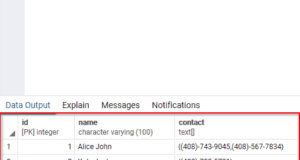
1.Enter the following command in the query editor to check if the change was successful:
SELECT * FROM Employees;
2.Click the “Run” button.
It should return the following:
Search in PostgreSQL array
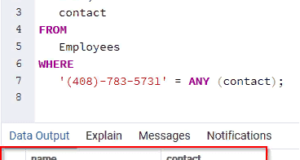
Step 1) Enter the following query in the query editor:
SELECT
name,
contact
FROM
Employees
WHERE
'(408)-783-5731' = ANY (contact);
Step 2) Click the “Run” button.
It should return the following:
Expanding arrays
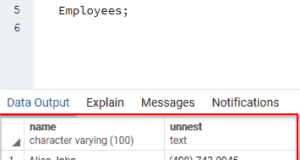
Step 1) Enter the following query in the query editor:
SELECT
name,
unnest(contact)
FROM
Employees;
Step 2) Click the “Run” button.
It should return the following:
Summary:
- PostgreSQL allows us to define a table column as an array type.
- The array must have a valid data type, e.g. integer, character or custom.
- To insert values into the column of an array, we use the ARRAY constructor.
- If there is more than one element in one row of the array column, the first element is at position 1.
- Each value can be accessed by passing the lower index in square brackets [].
- The elements of the array can be obtained by using the SELECT instruction.
- The values of an array column can be enclosed in square brackets [] or curly brackets {}.
- We can search for array column values using the ANY function ().
Enteros
About Enteros
IT organizations routinely spend days and weeks troubleshooting production database performance issues across multitudes of critical business systems. Fast and reliable resolution of database performance problems by Enteros enables businesses to generate and save millions of direct revenue, minimize waste of employees’ productivity, reduce the number of licenses, servers, and cloud resources and maximize the productivity of the application, database, and IT operations teams.
The views expressed on this blog are those of the author and do not necessarily reflect the opinions of Enteros Inc. This blog may contain links to the content of third-party sites. By providing such links, Enteros Inc. does not adopt, guarantee, approve, or endorse the information, views, or products available on such sites.
Are you interested in writing for Enteros’ Blog? Please send us a pitch!
RELATED POSTS
What Drives Growth in Technology Platforms: Enteros AI SQL, Database Management, and Performance Metrics
- 11 March 2026
- Database Performance Management
Introduction Technology platforms have become the backbone of the modern digital economy. From SaaS products and cloud-native applications to AI-powered analytics and global digital marketplaces, technology enterprises rely on robust infrastructure to deliver reliable, scalable services to millions of users. At the center of these digital ecosystems lies one of the most critical components of … Continue reading “What Drives Growth in Technology Platforms: Enteros AI SQL, Database Management, and Performance Metrics”
How to Modernize Fashion Data Platforms with Enteros Database Management and Generative AI
Introduction The global fashion industry has transformed dramatically in the digital era. Once driven primarily by seasonal collections and physical retail, fashion brands today rely heavily on digital platforms, e-commerce marketplaces, data analytics, and AI-powered customer experiences. From trend forecasting and inventory management to real-time customer engagement, modern fashion businesses are powered by complex data … Continue reading “How to Modernize Fashion Data Platforms with Enteros Database Management and Generative AI”
How Banking Platforms Achieve Accurate Cost Estimation with Enteros GenAI and Cloud Cost Attribution
- 10 March 2026
- Database Performance Management
Introduction The banking industry is undergoing one of the most significant technological transformations in its history. Digital banking platforms, mobile payment systems, AI-powered fraud detection, and real-time financial analytics are now fundamental components of modern banking operations. These innovations rely on powerful cloud infrastructure and highly optimized databases to process millions of financial transactions every … Continue reading “How Banking Platforms Achieve Accurate Cost Estimation with Enteros GenAI and Cloud Cost Attribution”
From Performance Monitoring to Growth Intelligence: Enteros AIOps for Technology Enterprises
Introduction Technology enterprises are operating in an era where digital platforms determine market success. Software products, cloud platforms, SaaS applications, data analytics tools, and AI-powered systems are the backbone of modern businesses. Behind these digital services lies an intricate ecosystem of databases, cloud infrastructure, and applications that must operate at peak performance. For technology companies, … Continue reading “From Performance Monitoring to Growth Intelligence: Enteros AIOps for Technology Enterprises”