Preamble

PostgreSQL INTERSECT statement returns the intersection of 2 or more data sets. Each data set is defined by the SELECT operator.
If a record exists in both datasets, it will be included in the INTERSECT results. However, if a record exists in one dataset rather than in the other, it will be omitted from the INTERSECT results.
INTERSECT query
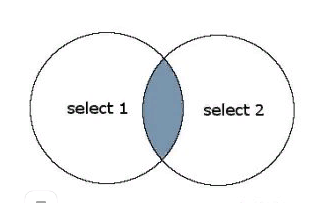
Explanation: Request INTERSECT will return the records in the blue shaded area. These are the entries that exist in both select 1 and select 2.
Each SELECT statement in INTERSECT must have the same number of fields in the result sets with the same data types.
The syntax for the INTERSECT statement in PostgreSQL
SELECT expression1_id, expression2id,... expression_n_id
FROM tabs
[WHERE conds]
INTERSECT
SELECT expression1_id, expression2_id,... expression_n_id
FROM tabs
[WHERE conds];
Parameters and arguments of the statement
- expression1_id, expression2_id, expression_n_id – The Stollblock or the calculations you want to get.
- tabs – The tables from which you want to get the records. The FROM operator must specify at least one table.
- WHERE conds – Optional. These are the conditions that must be met to select records.
Note:
- Both SELECT operators must have the same number of expressions.
- The corresponding expressions must have the same data type in the SELECT operators.
For example, expression1_id must have the same data type in both the first and second SELECT operators.
Example of an INTERSECT statement with one expression
Below is an example of the INTERSECT operator, which has one field with the same data type:
SELECT category_id
FROM products
INTERSECT
SELECT category_id
FROM inventory;
In this example INTERSECT, if a category_id appears in both the products table and the inventory table, will appear in your resulting set.
Now let us complicate our example by adding WHERE conditions to the INTERSECT request.
SELECT category_id
FROM products
WHERE category_id < 800
INTERSECT
SELECT category_id
FROM inventory
WHERE quantity > 5;
In this example, WHERE has been added to each data set. The first dataset has been filtered out so that only those entries from the products table where category_id is less than 800 are returned. The second dataset has been filtered by entries from the inventory table where the quantity is larger than 5.
Example of an operator with several expressions
Below we will consider an example of using the INTERSECT operator in PostgreSQL to return more than one column.
For example:
SELECT contact_id, last_name, first_name
FROM contacts
WHERE last_name <> 'Ivanov'
INTERSECT
SELECT customer_id, last_name, first_name
FROM customers
WHERE customer_id < 100;
In this example, the INTERSECT query will return records from the contacts table where contact_id, last_name, and first_name values correspond to customer_id, last_name, and first_name values from the customer’s table.
Each dataset has WHERE conditions for further filtering of the results so that only the records from contacts are returned where last_name does not equal ‘Ivanov’. Records from the customer_id table are returned where customer_id is less than 100.
Example of an operator using ORDER BY
Below is an example of INTERSECT, which uses ORDER BY :
SELECT contact_id, contact_name
FROM contacts
WHERE contact_id < 100
INTERSECT
SELECT company_id, company_name
FROM companies
WHERE state = 'Nevada'
ORDER BY 1;
Since the column names of the two SELECT operators are different, it is more advantageous to refer to the columns in ORDER BY by their position in the resulting set. In this example, we have sorted the results by contact_id / company_id in ascending order as ORDER BY 1.
The fields contact_id / company_id are at position #1 in the resulting set.
Intersect operator in SQL Server
About Enteros
Enteros offers a patented database performance management SaaS platform. It proactively identifies root causes of complex business-impacting database scalability and performance issues across a growing number of clouds, RDBMS, NoSQL, and machine learning database platforms.
The views expressed on this blog are those of the author and do not necessarily reflect the opinions of Enteros Inc. This blog may contain links to the content of third-party sites. By providing such links, Enteros Inc. does not adopt, guarantee, approve, or endorse the information, views, or products available on such sites.
Are you interested in writing for Enteros’ Blog? Please send us a pitch!
RELATED POSTS
Using Predictive AIOps and FinOps to Improve Healthcare Application Reliability
- 26 August 2026
- Database Performance Management
Introduction Healthcare organizations increasingly depend on digital applications to support patient care, clinical workflows, administrative operations, and data-driven decision-making. Electronic health record (EHR) systems, telehealth platforms, patient portals, diagnostic applications, insurance systems, laboratory platforms, and healthcare analytics solutions all require reliable and responsive IT infrastructure. As these applications become more connected and data-intensive, maintaining reliability … Continue reading “Using Predictive AIOps and FinOps to Improve Healthcare Application Reliability”
How to Optimize Higher Education Technology with Enteros Database Software, AIOps, and Cloud FinOps
Introduction Universities and higher education institutions are undergoing rapid digital transformation. Learning Management Systems, student portals, online examinations, digital libraries, research platforms, admissions systems, finance applications, and campus management platforms have become essential infrastructure. At the same time, higher education organizations are under pressure to manage technology budgets carefully. Read more”Indian Country” highlights Enteros and … Continue reading “How to Optimize Higher Education Technology with Enteros Database Software, AIOps, and Cloud FinOps”
How AIOps and FinOps Strengthen Digital Healthcare Infrastructure and Cost Efficiency
Introduction The healthcare industry is undergoing one of the most significant digital transformations in its history. Hospitals, healthcare providers, insurance organizations, telehealth platforms, diagnostic centers, and healthcare technology companies increasingly rely on digital systems to deliver patient care, manage medical records, process claims, support remote consultations, and analyze clinical data. As healthcare organizations embrace cloud … Continue reading “How AIOps and FinOps Strengthen Digital Healthcare Infrastructure and Cost Efficiency”
How to Optimize Real Estate Technology Operations with Enteros Database Software, AI-Powered Analytics, and Database Observability
Introduction Real estate organizations are becoming increasingly technology-driven. Property management platforms, online listings, tenant applications, leasing systems, CRM, property accounting, smart-building platforms, investment analytics, and digital marketplaces all depend on reliable databases. Real estate businesses also increasingly use AI and analytics to understand property demand, pricing, occupancy, customer behavior, and investment opportunities. Read more”Indian Country” … Continue reading “How to Optimize Real Estate Technology Operations with Enteros Database Software, AI-Powered Analytics, and Database Observability”