Preamble
It is well known that poor database performance results from high network latency. For the libpq C API, PostgreSQL v14 introduced “pipeline mode,” which is especially helpful to achieve acceptable performance over slow network connections. This article might be interesting to you if you use a hosted database in “the cloud.”
The PostgreSQL extended query protocol
We must comprehend the message flow between the client and server in order to comprehend pipeline mode. Using the extended query protocol, the following statements are handled:
- The server receives a “Parse” message along with the statement.
- The server receives a “Bind” message with parameter values.
- The server receives an “Execute” message asking for the results of the query.
In order to complete the database transaction, a “Sync” message is sent. Usually, a single TCP packet contains all of these messages. All of the above messages are generated by a call to the PQexec or PQexecParams functions of libpq. In the case of a prepared statement, the “Parse” step is separated from the “Bind” and “Execute” steps.
The client watches for a response from the server after sending “Sync.” The server analyzes the request and responds with
- a “ParseComplete” notification
- a “BindComplete” notification
- Messages containing “Data” or “NoData,” depending on the statement type
- a “CommandComplete” message to show that the statement’s processing is complete
Lastly, the server sends a “ReadyForQuery” message to show that the transaction is done and it is ready for more. One TCP packet, once more, is usually sent with each of these messages.
How pipeline mode works
Pipeline mode is nothing new on the frontend/backend protocol level. It only depends on the ability to send multiple statements before sending “Sync.” This allows you to send multiple statements in a single transaction without waiting for a response from the server. The libpq API’s support for this is something new. The following new functions were added in PostgreSQL 14.
PQenterPipelineModeto switch to pipeline modePQsendFlushRequest: sends a "Flush" message to instruct the server to immediately begin sending back answers to earlier requests; otherwise, the server will attempt to combine all answers into a single TCP packet.PQpipelineSync: sends a “Sync” message – you must call this explicitlyPQexitPipelineModeturn off pipeline modePQpipelineStatus: shows if libpq is in pipeline mode or not
The statements themselves are sent using the asynchronous query execution functions PQsendQuery, PQsendQueryParams and PQsendQueryPrepared, and after the “Sync” message has been sent, PQgetResult is used to receive the responses.
You can use pipeline mode with older PostgreSQL server versions because everything involved does not depend on brand-new features of the frontend/backend protocol.
Performance advantages of pipeline mode
Consider the scenario of a straightforward financial transfer using a table like
Create a table called account with the following columns: holder text, numeric(15,2), and bigint as the primary key.
We must carry out a transaction like this in order to move money from one account to another.
UPDATE account SET amount = amount + 100 WHERE id = 42; UPDATE account SET amount = amount - 100 WHERE id = 314; COMMIT; BEGIN;
The entire transaction will experience eight times the network latency due to the four round trips that are required for normal processing from the client to the server.
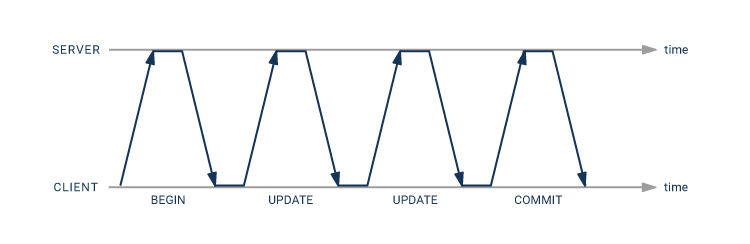
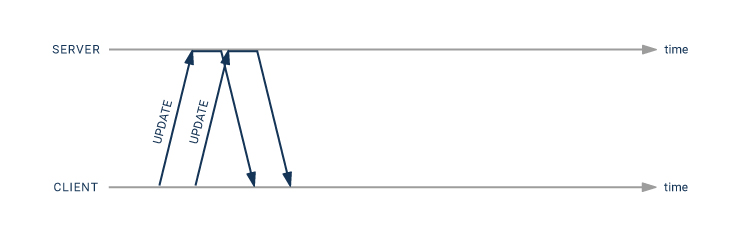
When using the pipeline mode, you can get away with having only twice as much network latency:
- the second
UPDATEstatement can be sent immediately after the first one - there is no need for an explicit transaction, since a pipeline automatically is a single transaction
A code sample using pipeline mode
This is C code that can be used to process the above transaction. It uses a prepared statement stmt for this UPDATE statement:
UPDATE account SET amount = amount + $2 WHERE id = $1 RETURNING amount;
In order to focus on the matter at hand, I have omitted the code to establish a database connection and prepare the statement.
#include <libpq-fe.h> #include <stdio.h> /* * Receive and check a statement result. * If "res" is NULL, we expect a NULL result and * print the message if we get anything else. * If "res" is not NULL, the result is stored there. * In that case, if the result status is different * from "expected_status", print the message. */ static int checkResult(PGconn *conn, PGresult **res, ExecStatusType expected_status, char * const message) { PGresult *r; if (res == NULL) { if ((r = PQgetResult(conn)) == NULL) return 0; PQclear(r); fprintf(stderr, "%s: unexpected result\n", message); return 1; } if ((*res = PQgetResult(conn)) == NULL) { fprintf(stderr, "%s: missing result\n", message); return 1; } if (PQresultStatus(*res) == expected_status) return 0; fprintf(stderr, "%s: %s\n", message, PQresultErrorMessage(*res)); PQclear(*res); return 1; } /* transfer "amount" from "from_acct" to "to_acct" */ static int transfer(PGconn *conn, int from_acct, int to_acct, double amount) { PGresult *res; int rc; char acct[100], amt[100]; /* will fit a number */ char * const values[] = { acct, amt }; /* parameters */ /* enter pipeline mode */ if (!PQenterPipelineMode(conn)) { fprintf(stderr, "Cannot enter pipeline mode: %s\n", PQerrorMessage(conn)); return 1; } /* send query to subtract amount from the first account */ snprintf(values[0], 100, "%d", from_acct); snprintf(values[1], 100, "%.2f", -amount); if (!PQsendQueryPrepared(conn, "stmt", /* statement name */ 2, /* parameter count */ (const char * const *) values, NULL, /* parameter lengths */ NULL, /* text parameters */ 0)) /* text result */ { fprintf(stderr, "Error queuing first update: %s\n", PQerrorMessage(conn)); rc = 1; } /* * Tell the server that it should start returning results * right now rather than wait and gather the results for * the whole pipeline in a single packet. * There is no great benefit for short statements like these, * but it can reduce the time until we get the first result. */ if (rc == 0 && PQsendFlushRequest(conn) == 0) { fprintf(stderr, "Error queuing flush request\n"); rc = 1; } /* * Dispatch pipelined commands to the server. * There is no great benefit for short statements like these, * but it can reduce the time until we get the first result. */ if (rc == 0 && PQflush(conn) == -1) { fprintf(stderr, "Error flushing data to the server: %s\n", PQerrorMessage(conn)); rc = 1; } /* send query to add amount to the second account */ snprintf(values[0], 100, "%d", to_acct); snprintf(values[1], 100, "%.2f", amount); if (rc == 0 && !PQsendQueryPrepared(conn, "stmt", /* statement name */ 2, /* parameter count */ (const char * const *) values, NULL, /* parameter lengths */ NULL, /* text parameters */ 0)) /* text result */ { fprintf(stderr, "Error queuing second update: %s\n", PQerrorMessage(conn)); rc = 1; } /*--- * Send a "sync" request: * - flush the remaining statements * - end the transaction * - wait for results */ if (PQpipelineSync(conn) == 0) { fprintf(stderr, "Error sending \"sync\" request: %s\n", PQerrorMessage(conn)); rc = 1; } /* consume the first statement result */ if (checkResult(conn, &res, PGRES_TUPLES_OK, "first update")) rc = 1; else printf("Account %d now has %s\n", from_acct, PQgetvalue(res, 0, 0)); if (res != NULL) PQclear(res); /* the next call must return nothing */ if (checkResult(conn, NULL, -1, "end of first result set")) rc = 1; /* consume the second statement result */ if (checkResult(conn, &res, PGRES_TUPLES_OK, "second update")) rc = 1; else printf("Account %d now has %s\n", to_acct, PQgetvalue(res, 0, 0)); if (res != NULL) PQclear(res); /* the next call must return nothing */ if (checkResult(conn, NULL, -1, "end of second result set")) rc = 1; /* consume the "ReadyForQuery" response */ if (checkResult(conn, &res, PGRES_PIPELINE_SYNC, "sync result")) rc = 1; else if (res != NULL) PQclear(res); /* exit pipeline mode */ if (PQexitPipelineMode(conn) == 0) { fprintf(stderr, "error ending pipeline mode: %s\n", PQresultErrorMessage(res)); rc = 1; } return rc; }
Measuring the speed improvement with pipeline mode
To verify the improvement in speed , I used the tc utility on my Linux system to artificially add a 50 millisecond latency to the loopback interface:
sudo tc qdisc add dev lo root netem delay 50ms
This can be reset with
sudo tc qdisc del dev lo root netem
I timed the above function as well as a function that used an explicit transaction and no pipeline:
|
no pipeline (8 times network latency)
|
pipeline (2 times network latency)
|
|
|---|---|---|
|
first attempt
|
406 ms
|
111 ms
|
|
second attempt
|
414 ms
|
104 ms
|
|
third attempt
|
414 ms
|
103 ms
|
With short SQL statements like these, the speed gain from pipelining is almost proportional to the client-server round trips saved.
An alternative way to get a similar speedup
You can write a PL/pgSQL function or procedure to achieve a similar performance improvement if you don’t want to use the libpq C API or the frontend/backend protocol directly.
Create a transfer procedure with the parameters p_from_acct bigint, p_to_acct bigint, and p_amount numeric. LANGUAGE plpgsql AS $$BEGIN UPDATE account SET amount = amount - p_amount WHERE id = p_from_acct; UPDATE account SET amount = amount + p_amount WHERE id = p_to_acct; END;$$;
Because it only requires one transaction to complete, this will also complete quickly.
- you have only a single client-server round trip for the
CALLstatement - In PL/pgSQL, SQL statement execution plans are cached
Writing a PL/pgSQL procedure is in this case probably the simpler solution. However, unlike a function, pipeline mode gives you fine control over the message and data flow between the client and server.
This solution might not be applicable to you if you work in a setting where database functions are frowned upon. But you can expect to occasionally suffer if you have strongly held religious beliefs!
Conclusion
Pipeline mode, which was added to PostgreSQL v14 with the libpq C API, makes it possible for slow network connections to run much faster. It can be used with older server versions as well because it doesn’t make use of new features in the frontend/backend protocol. Using PL/pgSQL functions, similar performance gains are frequently possible.
About Enteros
Enteros offers a patented database performance management SaaS platform. It proactively identifies root causes of complex business-impacting database scalability and performance issues across a growing number of clouds, RDBMS, NoSQL, and machine learning database platforms.
The views expressed on this blog are those of the author and do not necessarily reflect the opinions of Enteros Inc. This blog may contain links to the content of third-party sites. By providing such links, Enteros Inc. does not adopt, guarantee, approve, or endorse the information, views, or products available on such sites.
Are you interested in writing for Enteros’ Blog? Please send us a pitch!
RELATED POSTS
What Drives Growth in Fashion Tech: Enteros AI SQL, Database Performance Management, and RevOps Intelligence
- 3 March 2026
- Database Performance Management
Introduction The fashion industry has evolved into a digital-first, data-intensive ecosystem. Global apparel brands, luxury houses, direct-to-consumer startups, and fast-fashion giants now compete not just on design and brand—but on digital performance. E-commerce platforms must handle flash sales without crashing. Omnichannel inventory systems must synchronize in real time. AI-driven personalization engines must respond instantly. Pricing … Continue reading “What Drives Growth in Fashion Tech: Enteros AI SQL, Database Performance Management, and RevOps Intelligence”
Who Should Use Enteros for Financial Performance Optimization and Cloud Cost Governance?
Introduction The financial sector is under relentless pressure to grow—without increasing risk, cost, or operational complexity. Digital-first banks are reshaping customer expectations. Capital markets firms demand real-time analytics. Insurers are automating underwriting and claims. Fintech startups scale at cloud speed. Meanwhile, regulatory requirements intensify, margins tighten, and infrastructure costs rise. At the center of all … Continue reading “Who Should Use Enteros for Financial Performance Optimization and Cloud Cost Governance?”
How to Accelerate Banking Growth with Enteros Performance Management and Generative AI
- 2 March 2026
- Database Performance Management
Introduction The banking industry is evolving at unprecedented speed. Digital-first challengers are redefining customer expectations. Legacy institutions are modernizing core systems. Real-time payments, open banking frameworks, AI-driven fraud detection, and personalized financial services are now standard. But beneath every digital innovation lies a critical truth: Banking growth depends on performance. Read more”Indian Country” highlights Enteros … Continue reading “How to Accelerate Banking Growth with Enteros Performance Management and Generative AI”
What Drives Profitability in Fashion Tech: AI SQL, Cost Attribution, and Database Governance with Enteros
Introduction The fashion industry has transformed into a digital-first ecosystem. Global apparel brands, luxury retailers, direct-to-consumer startups, and fast-fashion giants now rely on sophisticated technology stacks to power: E-commerce platforms Omnichannel inventory systems Read more”Indian Country” highlights Enteros and its database performance management platform *Real-time pricing engines Demand forecasting models Supply chain visibility tools Read … Continue reading “What Drives Profitability in Fashion Tech: AI SQL, Cost Attribution, and Database Governance with Enteros”